



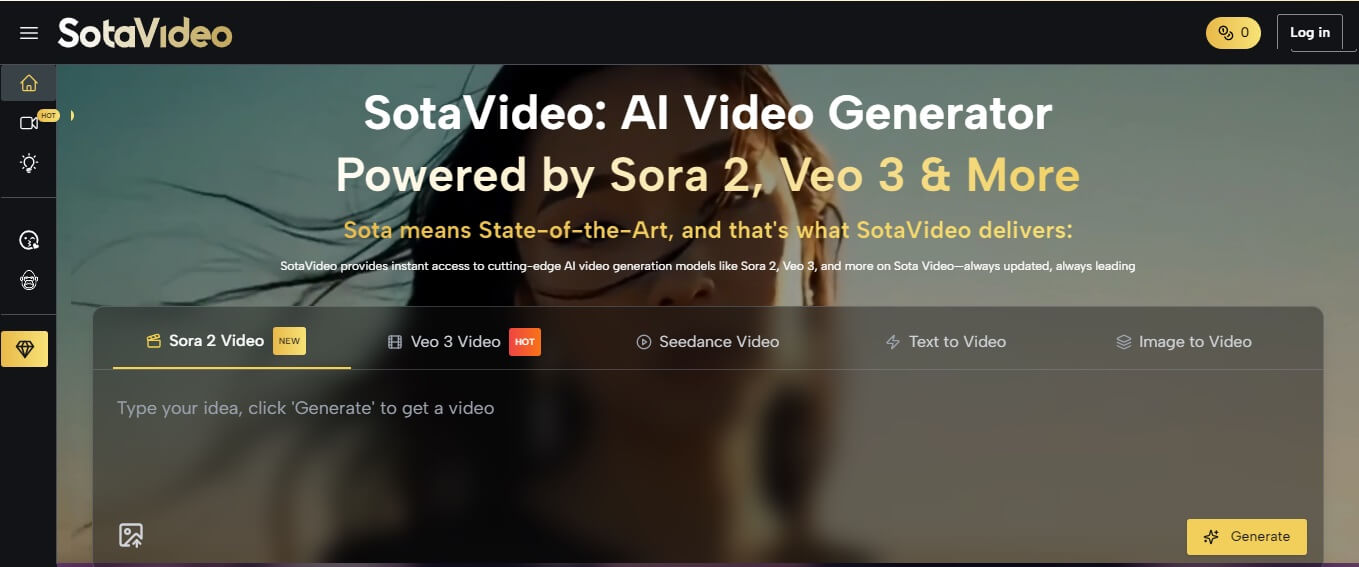
Sora 2 Creative Control: Mastering Text & Image Inputs for Professional Video Production
The biggest barrier to entry for Sora 2 isn't access-it's the language barrier. Many creators find themselves staring at the prompt box, unsure of how to translate a specific cinematic vision into text.
You might have a perfect scene in your head, but if you don't know the specific syntax for lighting, physics, and camera movement, the result is often a distorted, unusable clip.
The reality is that effective prompting has a steep learning curve. But what if you could skip the trial-and-error phase?
You no longer need to guess specific keywords or waste credits on failed experiments. By utilizing dedicated sora2 prompt tools and comprehensive writing tutorials, you can instantly upgrade your workflow.
This article explores how to harness these specialized resources to bypass the complexity and achieve the style consistency and narrative coherence that professional workflows demand.
Sora 2 Input Modes: The Dual Engine
Sora 2 operates on a hybrid input system. Understanding when to use Text-to-Video versus Image-to-Video is the first step in mastering the tool.
Text-to-Video: The Conceptual Canvas
Text-to-Video is best used for ideation and establishing shots. It creates the foundational logic of the scene. In Sora 2, the natural language understanding is significantly upgraded, meaning the model understands cinematic terminology (e.g., "dolly zoom," "rack focus") with higher fidelity than its predecessors.
Image-to-Video: The Anchor for Consistency
For designers, Image-to-Video is a game-changer. By uploading a reference frame—created perhaps in Midjourney or Photoshop-you provide Sora 2 with an immutable "anchor."
Character Consistency: Upload a character sheet to ensure your protagonist looks the same across multiple clips.
Brand Guidelines: Feed the model a static image containing your brand's exact hex color palette.
Core Control Points of Writing Sora 2 Prompt
To transition from "cool clips" to "storytelling," you must master three specific control levers.
Style and Mood Settings
Sora 2 allows for granular control over the aesthetic "temperature" of the video. This involves defining the light source (e.g., "volumetric lighting") and film stock simulation (e.g., "Kodak Portra 400 grain").
Camera Movement and Pacing
One of the most powerful features of Sora 2 is the ability to direct the camera. You can dictate specific moves like "tracking shot" or "F-PV drone dive," and control the pacing to match a high-octane chase or a meditative landscape.
Detail Consistency and Variable Management
This involves distinguishing between elements that must not change (the subject) and elements that can change (the background).
The Secret Weapon: SotaVideo's AI Prompt Generator
Understanding the theory of controls is one thing; executing it efficiently under a deadline is another. Writing complex prompts from scratch often leads to "writer's block" or wasted generation credits.
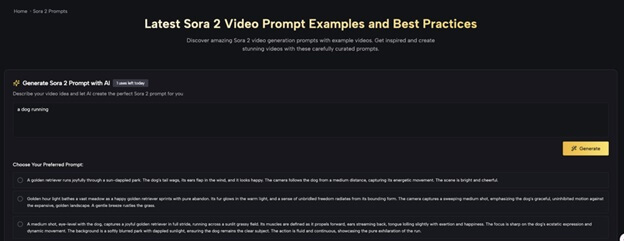
This is where the SotaVideo platform offers a distinct advantage. As seen in the interface, the site features a powerful "Generate Sora 2 Prompt with AI" tool that acts as a copilot for your creativity.
From Simple Concept to Professional Prompt
The tool addresses the biggest pain point in AI video: Prompt Engineering. As shown in the tool's interface, you don't need to be a prompt expert to start. You simply input a raw idea, such as "a dog running."
The AI then expands this simple concept into multiple, professionally structured options, such as:
1. The Narrative Option: "A golden retriever runs joyfully through a sun-dappled park... The camera follows the dog from a medium distance..."
2. The Cinematic Option: "Golden hour light bathes a vast meadow... The camera captures a sweeping medium shot..."
3. The Technical Option: "A medium shot, eye-level with the dog... focus is sharp on the dog's ecstatic expression..."
Why This Tool Matters for Workflow
1. Keyword Enrichment: The tool automatically injects high-value cinematic keywords (e.g., "sun-dappled," "shallow depth of field," "dynamic movement") that Sora 2 needs to render high-quality output.
2. Option Variety: It provides different "flavors" of the same scene, allowing you to choose between a documentary look or a stylized commercial look without rewriting.
3. Proven Efficiency: These aren't random words; they are based on "Latest Sora 2 Video Prompt Examples and Best Practices" that have been tested to work.
Practical Workflows: From Tool to Video
Let’s look at how to integrate the SotaVideo tool into a real-world production workflow.
Scenario A: Brand Commercial (Pet Product)
Goal: A high-energy clip of a dog for a pet food commercial. Old Workflow: You type "dog running in park" and get a low-quality, generic video.
New SotaVideo Workflow:
-
Enter "dog running" into the SotaVideo AI generator.
-
Select the "Golden hour light" option generated by the tool.
-
Copy and Paste the prompt into Sora 2.
-
Optional: Use Image-to-Video by attaching a photo of the specific dog breed you are advertising to ensure the prompt applies to your specific subject.
Result: A broadcast-ready clip with warm lighting and professional camera movement, generated in seconds.
Scenario B: Atmospheric Short Film
Goal: A moody, mysterious scene.
Workflow:
-
Enter "man walking in rain" into the generator.
-
The tool generates a prompt adding details like "neon reflections," "cyberpunk aesthetic," and "slow-motion rain droplets."
-
Copy this enriched prompt to maintain a high-budget look without spending hours researching lighting terms.

Common Mistakes and Tuning Tips
Even with advanced tools, creators often stumble into common traps.
Over-Prompting vs. Under-Prompting
Mistake: Writing a 500-word paragraph trying to control every pixel. Fix: Use the SotaVideo tool's output as the "Goldilocks" standard. Note how the generated examples are descriptive but not cluttered. They focus on Lighting + Subject + Camera Action.
Neglecting the Aspect Ratio
Mistake: Generating in square (1:1) and trying to crop to 16:9 later.
Fix: Always append your aspect ratio (e.g., --ar 16:9) to the prompts you copy from the tool. This changes how the AI composes the shot.
Conclusion
Sora 2 is not just a generator; it is a synthesizer of creative intent. However, to truly unlock its potential, you need to speak its language. The gap between a vague idea and a stunning video is bridged by precise prompting.
By utilizing the SotaVideo AI Prompt Generator, you transform that workflow. You no longer need to memorize technical camera jargon; you simply provide the vision, and the tool provides the engineering. This allows you to focus on what matters most: the story.
Ready to Create? Don't stare at a blank text box. Visit sotavideo.ai to use the free AI Prompt Generator, explore the curated library of proven prompts, and start producing professional Sora 2 videos today.
Disclaimer: This article is for informational and educational purposes only. It is not official documentation or an endorsement of any platform, and features may change over time. Any third-party tools mentioned are for example only—please verify pricing, terms, and content rights before use.






Comments 0
No comments yet. Be the first to start the conversation.