



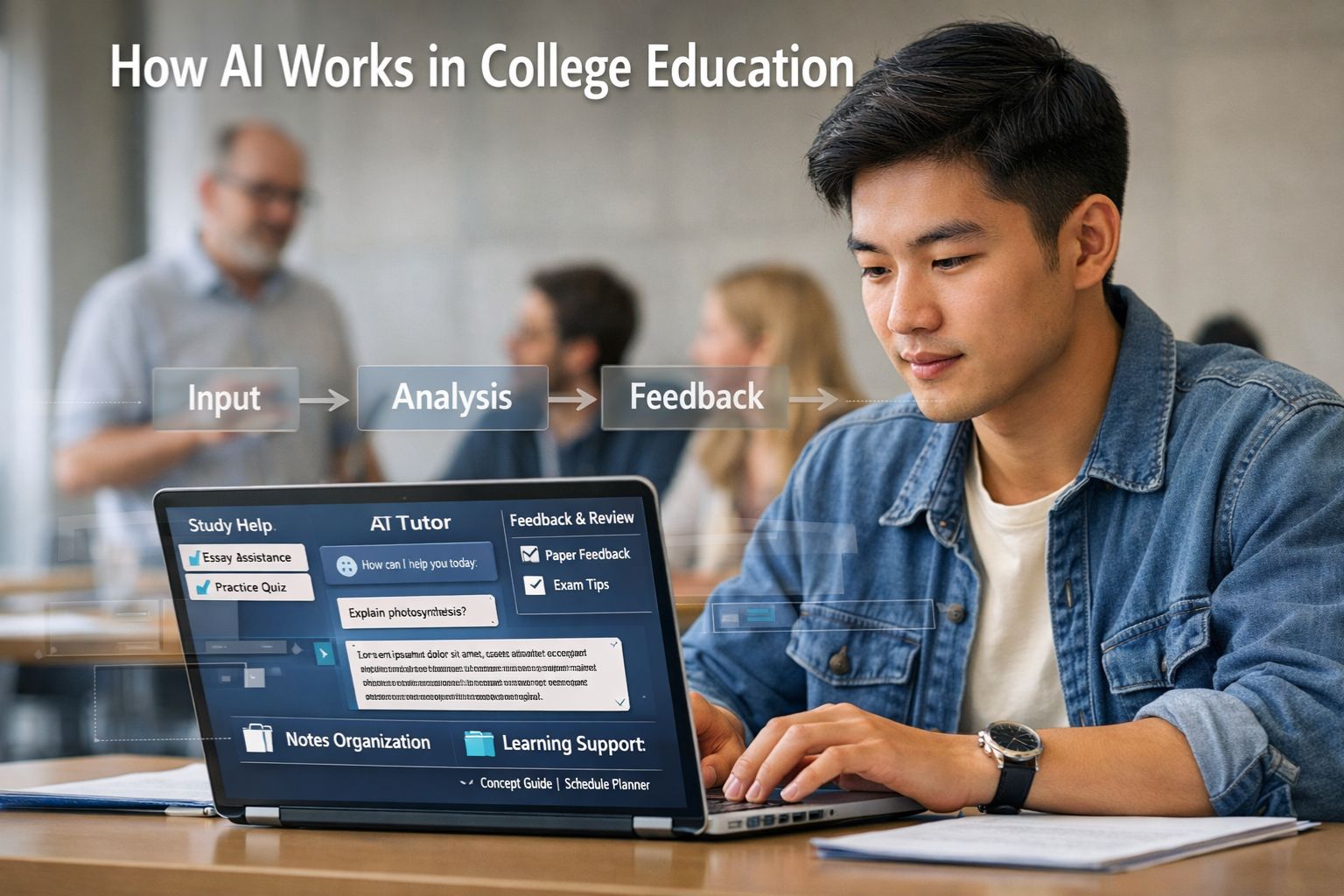
AI in college education works by taking an input, matching it against patterns learned from earlier data, and returning an output such as an answer, a summary, a recommendation, or a flag for review. In colleges and universities, those outputs can appear in tutoring tools, writing support, library search, accessibility tools, advising dashboards, student-service chat tools, and staff workflows. OECD frames AI in terms of capability domains such as language and reasoning, and the U.S. Department of Education describes AI as a set of capabilities for recognizing patterns and automating actions inside education technology systems.
Higher education is paying attention because this is no longer a side topic. UNESCO reported in 2025 that nearly two-thirds of surveyed higher education institutions linked to UNESCO Chairs or UNITWIN Networks already had AI guidance or were developing it. The same survey found 400 responses across 90 countries, and nine in ten respondents reported using AI tools in professional work. EDUCAUSE says AI is touching every area of the institution, while Jisc reports that students are already using AI but still want clearer guidance and fairer support.
For students, faculty, adult learners, and people returning to college, the central question is not whether AI exists. The practical question is how it works, what it is good at, what data it may rely on, and where a person still needs to check the result. This article explains the technology in plain language, shows where colleges use it, and lays out the trade-offs that matter before anyone treats an AI output as trustworthy.
Summary
AI in college education is a group of systems that turn questions, records, drafts, and other inputs into outputs such as feedback, explanations, summaries, recommendations, or support alerts. It can help with tutoring, accessibility, advising, and routine student services, but it can also produce errors, bias, privacy concerns, and overreliance. The safest view is to treat AI as a support tool around human teaching and judgment, not as a substitute for them.
Table of Content
- What is AI in college education?
- How does the technology work step by step?
- What does AI do for teaching and learning?
- How does AI support college services outside the classroom?
- What risks and governance questions matter most?
- How should students and colleges evaluate an AI tool?
- Conclusion
Key Takeaways
-
AI in college education is a family of tools, not one tool.
-
Different systems do different jobs: tutoring, writing support, advising, service chat, and risk flagging.
-
A common workflow is input, model processing, output, review, and revision.
-
Human judgment matters more as the stakes rise.
-
Uneven access, privacy, and bias remain central concerns.
-
Students want clearer rules and stronger support, not only access.
-
Colleges need policy, staff preparation, and review channels alongside the tools.
These points reflect recurring themes across UNESCO, OECD, NIST, Jisc, and EDUCAUSE.
What is AI in college education?
AI in college education is the use of computer systems that analyze inputs and return outputs that can support learning, teaching, advising, or campus operations. It is better understood as a set of uses than as one campus product. OECD and UNESCO both describe a wide education landscape that includes learner tools, teacher tools, and institution-level systems.
Explain: The basic idea
The basic idea is simple. A system receives information, compares it with patterns learned from earlier data, and produces an output. In a college setting, the input may be a student question, a draft paragraph, quiz performance, a help-desk request, or records from a campus platform. The output may be a study explanation, revision advice, a ranked list of resources, a chatbot reply, or an alert that asks a staff member to review a case. The U.S. Department of Education’s 2023 report describes AI in education in these terms and places pattern recognition and partial automation at the center of the discussion.
Inform: Main types of campus AI tools
Campus AI tools can be grouped into learner-centred tools, teacher-led tools, and institutional tools. OECD uses this distinction in its work on equity and inclusion in education. Learner-centred tools include tutoring or practice support. Teacher-led tools include assessment support or help with classroom materials. Institutional tools include chat services, operations support, and systems that identify patterns suggesting a student may need outreach.
Practical Insight: Where students meet AI
Students often meet AI in routine campus activity before they think about the technology itself. A writing assistant may suggest edits. A library search tool may rank sources. A course platform may recommend practice. A campus chatbot may answer questions about forms, deadlines, or office hours. EDUCAUSE reports that AI is affecting work across the institution, which helps explain why colleges are writing policy for academic use and service use at the same time.
Outcomes and Limitations: What these tools do well and where they fail
These tools are often good at speed, pattern matching, and routine support. They are weaker when the task depends on careful judgment, local context, high-stakes decisions, or thin evidence. UNESCO’s education pages stress both potential and risk, and the U.S. Department of Education argues that educators and institutions need to stay in control of how the tools are used.
How does the technology work step by step?
AI in college education usually follows a five-part path: input, model processing, output, human review, and revision. The details vary by tool, but this sequence helps explain both the value and the risk.
Explain: Inputs, models, and outputs
Inputs are the information the system receives. In college settings, that can include typed questions, selected answers, uploaded files, course readings, usage logs, or records from student systems. A model then estimates what output best fits the input based on the data and rules used in its development. The output may be text, a score, a recommendation, or a flag for review. The Department of Education notes that the quality of the output depends on the quality of the data and the design of the system.
A simple example helps. If a student asks for help understanding a biology topic, a chat-based text tool turns that request into data, identifies patterns linked to the topic, and returns a draft explanation. If the student asks a follow-up question, the next answer reflects the earlier exchange as well. The result can sound confident even when it is incomplete, which is why review matters.
Inform: How tutoring tools differ from early-alert systems
Tutoring tools and early-alert systems work on different kinds of evidence. A tutoring tool usually responds to immediate learning inputs such as a question or a draft answer. An early-alert system may work on patterns in grades, attendance, platform activity, or service interactions to estimate which students may need outreach. OECD separates learner-centred tools from institutional tools for this reason. A weak tutoring answer may waste time. A weak risk flag may affect trust, fairness, and student support.
Practical Insight: Four common campus workflows
A common student workflow is study support. A student asks for an explanation, a summary, or practice questions, then checks the result against class notes or assigned readings. A second workflow is writing support. A student pastes a paragraph into a tool and asks for help with clarity or structure, then decides which edits fit the assignment rules. A third workflow is instructor support. A teacher uses a tool to draft examples, quiz items, or discussion prompts, then reviews and rewrites the result before class use. A fourth workflow is student-service support. A chatbot handles routine requests, but complex cases move to staff.
Outcomes and Limitations: Why human review matters
Human review matters because fluent output can still be wrong, unfair, or misleading. NIST’s framework focuses on trustworthiness and risk management across the whole life cycle of an AI system, and the Department of Education argues that systems used in education should be inspectable, explainable, and open to override when needed. For students, that means checking the output. For colleges, that means setting rules for review, complaints, and correction.
What does AI do for teaching and learning?
AI can support teaching and learning by giving students extra practice, helping instructors prepare materials, and providing faster feedback in some tasks. Its strongest use is in a learning design that still leaves judgment, context, and final responsibility with teachers and students.
Explain: Tutoring, feedback, and practice
In learning contexts, AI often works as a support tool for explanation, revision, and repetition. A student can ask follow-up questions, request another example, or get practice matched to a topic. The Department of Education notes that AI may be embedded in the learning process and may provide feedback while a learner is still working through a problem. OECD’s learner-centred category also places tutoring systems and related tools in the student-facing part of the education landscape.
Inform: Course design, assessment support, and accessibility
For instructors, AI can help draft examples, discussion prompts, or low-stakes feedback. That does not remove the need for review. UNESCO’s framework for teachers places knowledge, skills, and values around AI use in the foreground, and OECD’s work on equity and inclusion points to the need for teacher preparation if these tools are going to be used well. Accessibility is another area where AI may help with captioning, translation, or alternate forms of interaction, though the quality of those supports still depends on design and local review.
Practical Insight: Student and teacher pathways
A grounded student pathway might look like this: a first-year student reads an assigned chapter, asks a tool for a simpler explanation of one concept, checks that explanation against lecture notes, and then writes a short summary in their own words. A grounded teacher pathway might look different: an instructor asks for several draft discussion prompts, drops the ones that do not fit the course, rewrites the rest, and uses one as a starting point for class. In both cases, the value comes from support around human work, not from handing over the whole task.
Outcomes and Limitations: Learning support versus skill loss
The main trade-off is between support and dependence. AI can widen access to extra practice and lower the friction of getting started. It can also reduce the amount of thinking a student does alone if it becomes a shortcut for reading, writing, or problem solving. Jisc’s 2025 reporting shows student concern about work-related skills and unequal access, while UNESCO’s rights-based work links AI use to wider questions of privacy, equity, and inclusion.
How does AI support college services outside the classroom?
AI supports college services by handling routine communication, sorting requests, and highlighting patterns in student activity that may suggest a need for outreach. This is why AI in higher education is as much an operations topic as a classroom topic.
Explain: Advising, help desks, and student services
In student services, AI may answer common questions, direct students to forms or offices, or sort incoming requests by topic. In advising, it may help flag patterns such as low engagement, missed tasks, or repeated help requests. OECD places these activities in its institutional category, and EDUCAUSE reports that higher education attention has widened from academic use to work across the institution.
Inform: Early alerts and institutional tools
Early-alert tools look for patterns in activity or performance and estimate which students may need support. That can help an advisor reach out sooner. It can also create trouble if the signals are weak or biased. A student may log in less because of work hours, disability, caregiving, or poor internet access rather than low commitment. UNESCO and the World Bank both stress that access conditions and system design shape whether AI serves students fairly.
Practical Insight: What data may be used
The data used in service tools can extend well beyond the gradebook. Education systems may draw on course activity, attendance patterns, service requests, and records from digital platforms. That makes service-side AI a governance issue as well as a technical one. Colleges need to know what data are collected, why they are collected, who can review them, how long they are kept, and how a student can ask for a human review or correction.
Outcomes and Limitations: False flags, fairness, and privacy
Service-side AI can reduce queue pressure and help staff notice patterns earlier. It can also produce false flags or hide weak decisions inside a smooth interface. UNESCO’s rights-based report, OECD’s work on equity and inclusion, and NIST’s risk framework all point to the same lesson: a useful service tool is not automatically a fair or accountable one. Those qualities need review, documentation, and staff oversight.
What risks and governance questions matter most?
The main risks are inaccurate output, bias, privacy loss, uneven access, and overreliance. Good governance asks whether the tool fits the task, whether people can review it, and whether students know how their data and results are being handled.
Explain: Accuracy, bias, privacy, and uneven access
Accuracy matters because confident output can still be false. Bias matters because weak data or design can treat some groups unfairly. Privacy matters because education systems may handle sensitive student information. Uneven access matters because students do not start with the same devices, connectivity, or paid tool access. UNESCO’s rights-based report says around 2.6 billion people still lacked internet access in 2024, which shows why an AI divide can grow out of the older digital divide. Jisc also reports student concern that unequal access to paid tools can deepen existing gaps.
Inform: Rights-based and risk-management guidance
UNESCO argues for a human-centred, rights-based approach so that AI strengthens learning opportunities without leaving learners behind. NIST offers a risk-management frame aimed at trustworthiness across design, development, use, and evaluation. The U.S. Department of Education adds a clear education rule: people should remain in the loop and systems should be open to inspection and override. These are not identical documents, but they point in the same direction.
Practical Insight: Questions students and colleges should ask
Students can ask a few direct questions before using a tool: What is this tool helping me do? Can I verify the output against course materials? Does the assignment policy allow this use? Am I still doing the learning myself? Colleges can ask a different set of questions: What data feed the tool? Who checks mistakes? Can a student request human review? Has the tool been tested for uneven effects? Do staff and students receive preparation before the tool is rolled out? These questions match the themes in UNESCO, NIST, Jisc, and the Department of Education.
Outcomes and Limitations: What responsible use looks like
Responsible use is not about praising or banning AI as a whole. It is about matching each tool to its task and risk level. A low-stakes brainstorming tool does not raise the same concerns as admissions screening, high-stakes assessment, or a student-risk system. UNESCO’s 2025 higher education survey, OECD’s policy work, and the World Bank’s discussion of governance all suggest the same lesson: policy, review, and capacity need to grow alongside the technology.
How should students and colleges evaluate an AI tool?
Students and colleges should evaluate an AI tool by asking what problem it solves, what evidence supports it, what data it uses, and what review remains in place. Good use depends on context, stakes, and design quality.
Explain: Fit for purpose
Fit for purpose means the tool matches the job. A summarization tool may help with first-pass review of a long reading. The same tool may be a poor fit for an assignment that requires original argument or careful citation. An advising flag may help prompt outreach, but it should not act as a final judgment about a student’s effort or ability. The Department of Education and NIST both support this kind of task-specific review.
Inform: A review checklist
A practical checklist can include seven points: purpose, evidence, data, review, fairness, access, and learning impact. Purpose asks what exact task the tool is meant to support. Evidence asks whether there is proof it works in education, not only in general. Data asks what goes into the tool and who controls that information. Review asks whether a person can inspect, correct, or override the output. Fairness asks whether uneven effects have been checked. Access asks whether all students can use the tool on fair terms. Learning impact asks whether the tool supports skill growth or bypasses it.
Practical Insight: Two self-check frameworks
For students, a workable self-check is: read first, ask second, verify third, rewrite in your own words, and cite the source material rather than the tool. For colleges, a workable self-check is: define the task, review the data, test the output, document the limits, prepare the users, and provide human recourse. These are working habits, not formal standards, but they align with the common themes across UNESCO, NIST, Jisc, and the Department of Education.
Outcomes and Limitations: Good use depends on context
No single rule fits every course, office, or student. In some settings, AI can widen access to practice, language support, or routine service help. In other settings, it can weaken learning habits or create unfairness if the review process is weak. UNESCO’s competency work for students and teachers underlines a simple point: people need knowledge, judgment, and ethical awareness around the tools, not only access to them.
Conclusion
AI technology works in college education by turning questions, drafts, records, and other inputs into outputs that can support learning or campus services. Its value is highest when the task is clear, the output is checked, and a person can review the result. Its weaknesses appear when a fluent answer is mistaken for sound judgment, or when access, privacy, and fairness are left unresolved. A sensible next step for any college is to review each use separately. Tutoring, feedback, advising, and service chat do not carry the same benefits or the same risks.
Sources Used
-
UNESCO. Artificial intelligence in education. 2026. UNESCO.
-
UNESCO. UNESCO survey: Two-thirds of higher education institutions have or are developing guidance on AI use. 2025. UNESCO.
-
UNESCO. AI and education: Protecting the rights of learners. 2025. UNESCO.
-
UNESCO. AI competency framework for students. 2026. UNESCO.
-
UNESCO. AI competency framework for teachers. 2026. UNESCO.
-
OECD. Artificial intelligence and education and skills. 2026 page. OECD.
-
OECD. The potential impact of Artificial Intelligence on equity and inclusion in education. 2024. OECD.
-
OECD. AI adoption in the education system. 2025. OECD.
-
U.S. Department of Education, Office of Educational Technology. Artificial Intelligence and the Future of Teaching and Learning. 2023. U.S. Department of Education.
-
NIST. AI Risk Management Framework. Current framework page. National Institute of Standards and Technology.
-
Jisc. Student perceptions of AI 2025. 2025. Jisc.
-
Jisc. Students worried about the impact of AI on future employability. 2025. Jisc.
-
EDUCAUSE. 2025 EDUCAUSE Horizon Report | Teaching and Learning Edition. 2025. EDUCAUSE.
-
EDUCAUSE. The Impact of AI on Work in Higher Education. 2026. EDUCAUSE.
-
World Bank. AI in Schools: Opportunities, Challenges & Realities for the Future of Learning. 2025. World Bank.





Comments 0
No comments yet. Be the first to start the conversation.