




Most students should choose a laptop as their main study device. A tablet can be useful for reading, handwritten notes, digital textbooks, video lessons, PDF annotation, and light assignments, but it is usually safer as a secondary device unless the student’s school, college, or course confirms that a tablet can complete every required task.
The real decision is not whether laptops or tablets are more modern, portable, or popular. The real question is whether the device can handle coursework, online classes, assignments, exams, software, files, and daily study habits without creating avoidable problems.
A tablet may feel easier to carry. A laptop may feel less natural for reading and handwritten notes. But students should not decide only by weight, design, trend, or starting price. The right choice depends on course requirements, typing workload, software compatibility, online exam rules, total setup cost, and access to another full computer.
Table of Content
- Quick Answer
- The Real Problem Behind the Comparison
- How This Comparison Is Judged
- Evidence Snapshot
- Laptop vs Tablet Comparison Table
- When a Laptop Is the Better Choice
- When a Tablet Makes More Sense
- Can a Tablet Replace a Laptop for Students?
- Note-Taking: Tablet, Laptop, or Paper?
- 2-in-1 Laptop vs Tablet with Keyboard
- Budget and Family Decision Pressure
- Reader-Specific Recommendation
- What Would Change the Verdict?
- Who Should Be Careful With Each Option?
- Common Mistakes
- Decision Checklist
- Final Verdict
- Freshness and Verification Note
Quick Answer
Choose a laptop if you need one dependable device for assignments, online classes, typing, presentations, spreadsheets, coding, file management, exams, or desktop software.
Choose a tablet if your study routine is mostly reading, note-taking, drawing, video learning, and light cloud-based work. A tablet also makes sense when you already have access to a laptop, desktop, computer lab, or school-provided device for heavier academic tasks.
Choose both only if your budget allows it and each device has a clear role. Consider a 2-in-1 laptop if you need laptop capability with occasional tablet-style use.
The Real Problem Behind the Comparison
Many students compare laptops and tablets as devices, but the practical issue is workflow. A student writing a research paper may need a browser, PDF reader, word processor, citation tool, notes app, file folder, and learning platform open together. A student reviewing a chapter may only need an e-book, highlighter, and note-taking app.
That difference matters.
A laptop usually handles multi-window work, desktop software, long typing, file management, and assignment submission more predictably. A tablet usually handles reading, touch input, handwritten notes, diagrams, and portability better.
The most misleading assumption is that a tablet with a keyboard automatically becomes a laptop. It does not. A keyboard improves typing, but the device still depends on its operating system, app support, browser behavior, ports, file handling, and exam compatibility.
How This Comparison Is Judged
This comparison uses six practical criteria:
-
Course requirements: Whether the school, college, or department requires a laptop, operating system, or specific software.
-
Assignment workload: How often the student writes long documents, uses spreadsheets, prepares presentations, or manages files.
-
Online learning and exams: Whether the device supports video classes, learning platforms, browser tools, and testing software.
-
Reading and note-taking: Whether the student needs handwritten notes, PDF annotation, diagrams, or textbook reading.
-
Total setup cost: The cost after accessories, storage, repair, and possible second-device needs.
-
Long-term usefulness: Whether the device can handle future academic requirements, not only current convenience.
No numerical score is used because device suitability depends on the student’s course, institution, budget, and study pattern.
Evidence Snapshot
Several institutional technology pages treat laptops as the safer primary device for many students. Excelsior University’s online learning guidance recommends laptops for its online courses and notes that a keyboard is needed for course discussions, materials, and assignment submission. The University of Denver IT laptop guidance says tablets, Chromebooks, and similar simple browsing devices are not recommended for most DU students. Oregon State University College of Business requires students to use laptops for coursework and says tablets or phones may be used for personal note-taking, not coursework.
These examples do not apply to every school. They show why students should check their own institution’s requirements before buying.
What still needs verification: current prices, student discounts, local availability, repair costs, exact model specifications, and exam-platform compatibility.
Laptop vs Tablet Comparison Table
| Criteria | Laptop | Tablet | Editorial Judgment |
|---|---|---|---|
| Primary study device | Stronger for broad academic work | Works when requirements are light or confirmed | Laptop is safer for most students who need one device |
| Long assignments | Better keyboard, full apps, easier file control | Possible with keyboard, but often less efficient | Laptop has the advantage for writing-heavy study |
| Online classes | Better for multitasking, chat, files, and tabs | Good for viewing lessons | Laptop is more reliable for active online learning |
| Reading and PDFs | Usable, but less natural for marking pages | Strong with touch and stylus | Tablet is stronger for reading and annotation |
| Handwritten notes | Possible on some 2-in-1 models | Usually more comfortable with stylus | Tablet has the advantage for handwritten notes |
| Course software | Better support for desktop apps | Depends on mobile or web apps | Laptop is safer where software is required |
| Portability | Portable but heavier | Lighter and easier to carry | Tablet is stronger for travel and quick study |
| Total setup cost | May need mouse, sleeve, storage, or repairs | May need keyboard, stylus, case, hub, or cloud storage | Compare full setup cost, not base price |
When a Laptop Is the Better Choice
A laptop is the stronger choice when the student needs one device to handle most academic tasks. This is especially relevant for college students, online learners, business students, engineering students, computer science students, design students, and anyone likely to install desktop software.
The reason is practical. Many academic tasks still depend on full desktop operating systems, stable file management, keyboard comfort, multiple browser tabs, and software compatibility. Assignments may need to be downloaded, renamed, converted, compressed, uploaded, or submitted through a learning management system. These tasks are usually smoother on a laptop.
A laptop is also more suitable for students who write often. Essays, lab reports, project documents, scholarship applications, research notes, and group presentations become harder when the keyboard is small, detachable, or unstable. A tablet keyboard can work for short writing, but long writing sessions usually favor a laptop.
For online classes, a laptop is safer when the student must attend video calls, type notes, open class materials, submit files, join chat, and manage browser tabs at the same time. A tablet can handle viewing and light participation, but active coursework often needs more than screen access.
When a Tablet Makes More Sense
A tablet makes sense when the student’s work is mostly reading, reviewing, annotating, and note-taking. A tablet with a stylus can replace printed handouts, loose papers, and some notebooks. It can be useful for students who read many PDFs, highlight textbook chapters, solve math problems by hand, draw diagrams, or revise slides while traveling.
A tablet may also work for school students whose classes use browser-based tools and do not require desktop software. It may be enough for short assignments, video lessons, light research, and cloud-based documents, especially when a family computer or school computer lab is available for heavier tasks.
Program variation matters. Fitchburg State University’s computer recommendations show that some programs may accept a laptop or iPad at the beginning, while other courses require a laptop or comparable device. This supports the main rule: the correct device depends on the program, not only the device category.
A tablet is strongest as a secondary device. If a student already has a reliable laptop, a tablet can improve reading, handwritten notes, and annotation. In that case, the tablet is not replacing the laptop; it is supporting one part of the study workflow.
Can a Tablet Replace a Laptop for Students?
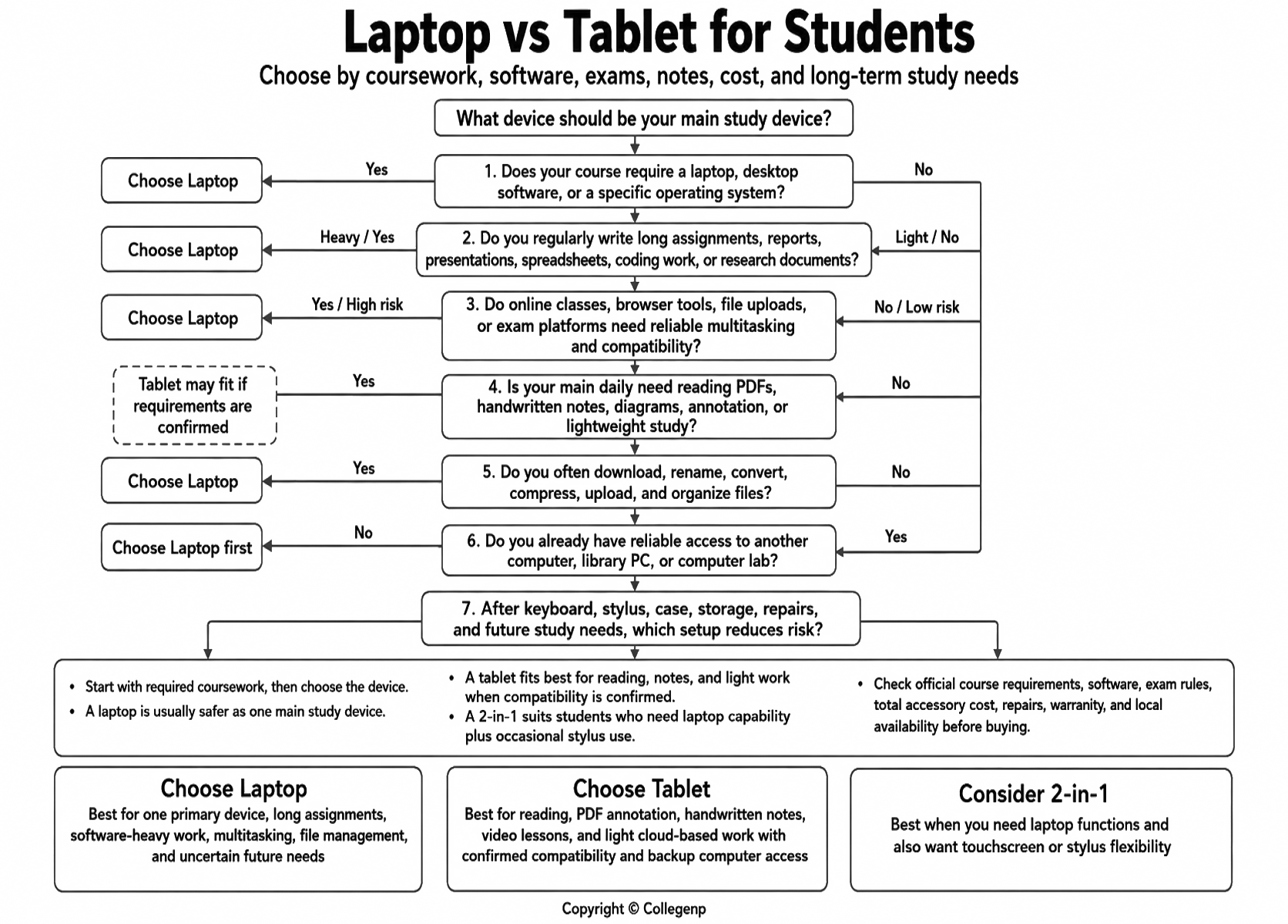
A tablet can replace a laptop only when all required academic work can be completed through supported apps, web tools, or cloud platforms. Before choosing tablet-only, check five points.
First, check whether your school, college, or department publishes device requirements. A general “bring a device” instruction does not automatically mean a tablet is enough.
Second, check whether your course requires desktop software. Coding, statistics, accounting, engineering, architecture, design, data analysis, and media production courses often need specific software.
Third, check online exam rules. Some proctoring or testing tools may not support all tablets, browsers, operating systems, or touch devices.
Fourth, check your typing workload. A student who writes long documents every week should not judge a tablet by a short demo.
Fifth, check backup access. A tablet-only setup is less risky if the student can use a home computer, library computer, or campus computer lab when needed.
If any of these checks fail, choose a laptop first.
Note-Taking: Tablet, Laptop, or Paper?
For note-taking, the issue is not only device type. It is also attention, processing, and review quality.
A tablet with a stylus may help students who learn by drawing, summarizing, mapping ideas, solving problems, or marking PDFs. A laptop may help students who need fast typing, searchable notes, structured folders, and easy document editing.
Research by Mueller and Oppenheimer found that students using laptops performed worse on conceptual questions than students taking longhand notes, partly because laptop note-takers tended to transcribe rather than process and reframe ideas. This does not prove that every student must use paper or a stylus. It does suggest that copying everything word-for-word is not the same as learning.
The practical rule is simple: use the device in a way that makes you think. If the device makes you copy, scroll, switch apps, or check messages constantly, it is weakening the study session.
2-in-1 Laptop vs Tablet with Keyboard
A 2-in-1 laptop can be useful because it keeps desktop operating system support and a keyboard-centered workflow while adding touchscreen or stylus use. For students who want one device for typing and occasional handwritten notes, it can be a reasonable middle option.
The trade-off is comfort. Some 2-in-1 laptops are heavier as tablets, less comfortable for long reading, or more expensive than basic laptops. They should still be judged by keyboard quality, battery life, repairability, operating system, and software support.
A tablet with a keyboard is different. It may look like a laptop, but it still depends on tablet apps, tablet operating system limits, ports, browser behavior, and file workflow. The better question is not “Does it look flexible?” The better question is “Can this exact setup complete my required work without workarounds?”
Budget and Family Decision Pressure
Students and parents often feel pressure to choose the device that appears modern, popular, or easy to carry. That can lead to a weak decision. A device should fit the student’s work, not the image around the device.
Budget also needs careful handling. Do not compare only the base tablet and base laptop. A tablet may need a keyboard case, stylus, stand, protective cover, hub, cloud storage, or replacement accessories. A laptop may need a sleeve, mouse, external storage, software, or repair budget.
A lower starting price does not always mean lower total cost. A tablet that later forces a second purchase can become expensive. A laptop that completes all coursework may cost less overall for a student who needs one device. But a tablet can still be a sensible purchase when the student already has computer access and mostly needs reading and notes.
Reader-Specific Recommendation
Choose a laptop if:
-
You need one primary device for school or college.
-
You write long assignments often.
-
Your course requires spreadsheets, coding tools, design software, statistics software, or exam software.
-
You need reliable file management and multitasking.
-
You are unsure about future academic requirements.
Choose a tablet if:
-
Your main tasks are reading, note-taking, PDF annotation, drawing, and watching lessons.
-
Your school confirms that tablet-based work is acceptable.
-
You already have access to a laptop, desktop, or computer lab.
-
You want a secondary device for notes and reading.
Be careful if:
-
You are buying a tablet only because it is lighter.
-
You assume a keyboard accessory solves all limitations.
-
Your course may require software that works only on Windows or macOS.
-
You have not checked exam-platform compatibility.
Verify before deciding:
-
School or department device requirements.
-
Required software and operating system.
-
Online exam platform rules.
-
Total setup cost after accessories.
-
Repair options and warranty terms.
What Would Change the Verdict?
The verdict changes if the student’s school confirms that tablets are accepted for all required work. It also changes if the student already has reliable access to a laptop, desktop, or computer lab.
The verdict may also change by course type. A reading-heavy course may be easier with a tablet. A writing-heavy, software-heavy, or exam-controlled course usually favors a laptop. Local price, repair access, warranty coverage, and accessory cost can also change the more suitable decision.
Who Should Be Careful With Each Option?
A student may not need a laptop-only setup if the main daily need is handwritten notes, diagram practice, PDF marking, or lightweight reading, and another full computer is already available for assignments.
A student should avoid a tablet-only setup if the course requires desktop software, long writing sessions, complex file management, online exam software, coding tools, design applications, or advanced spreadsheets.
These are not permanent rules. They are practical warnings based on workload and risk.
Common Mistakes
Students often make five avoidable mistakes.
First, they look only at price and ignore accessories. Second, they assume a tablet can replace a laptop because it has a keyboard. Third, they ignore course software and exam rules. Fourth, they follow trends instead of checking actual academic tasks. Fifth, they buy two devices when one dependable laptop would be enough.
The safer approach is to start with required work, then choose the device.
Decision Checklist
Before buying, answer these questions:
-
Does my school or department require a laptop or specific operating system?
-
Will I write long assignments regularly?
-
Will I need spreadsheets, coding, design tools, statistics software, or exam software?
-
Can I type comfortably for one hour on this setup?
-
Can I manage downloads, uploads, file folders, and cloud storage easily?
-
Do I need handwritten notes or PDF annotation every day?
-
Is this my only device?
-
What is the total cost after keyboard, stylus, case, storage, and repairs?
-
What evidence supports my final decision?
Final Verdict
For most students, a laptop is the safer first purchase. It handles long assignments, multitasking, desktop software, files, and online learning workflows more reliably. A tablet is strongest for reading, handwritten notes, annotation, portability, and secondary study use.
The verdict changes when the student’s course is light, fully cloud-based, and officially compatible with tablets, or when another full computer is already available. It also changes when a student’s main need is handwritten note-taking rather than full academic production.
The most practical takeaway is this: choose a laptop if you need one dependable study machine. Choose a tablet if your course requirements are light, confirmed, or already covered by another computer. Check official requirements before spending money.
Freshness and Verification Note
Device prices, discounts, product availability, model specifications, repair costs, and exam-platform compatibility can change. Students should verify the latest details from their school, department, software provider, and local seller before buying.
You can also read - Notebook vs Tablet vs Laptop: Which Is Best for Students?






Comments 0
No comments yet. Be the first to start the conversation.