



Choosing between a notebook, tablet, and laptop is not only about buying a device. For students, it is a study-workflow decision. The right choice depends on how the student takes notes, joins online classes, reads PDFs, writes assignments, submits files, prepares for exams, and uses course-specific software.
For most students who need one main device, a laptop is the safest choice because it handles typing, research, presentations, file management, spreadsheets, online classes, and desktop software better than a tablet. A tablet is useful for reading, PDF annotation, video lessons, and handwritten digital notes. A paper notebook still matters for focused writing, diagrams, formulas, rough work, and exam revision.
The word “notebook” also needs clarification. Some students mean a paper notebook. Others mean a notebook computer, which is often used for a portable laptop-style computer. This article covers both meanings so students and parents can decide by workload, not by device labels or trends.
Table of Content
- Quick Answer
- Quick Verdict Table
- What Does “Notebook” Mean?
- Paper Notebook: Best for Focused Notes and Exam Revision
- Tablet: Best for PDFs, Digital Notes, and Portability
- Laptop: Best for Assignments, Online Classes, and Software
- Notebook Computer: Best When You Want a Lightweight Laptop
- Best Choice by Student Type
- What to Check Before Choosing
- What Would Change the Verdict?
- Who Should Avoid Each Option?
- Common Mistakes and Decision Checklist
- Final Recommendation
Quick Answer
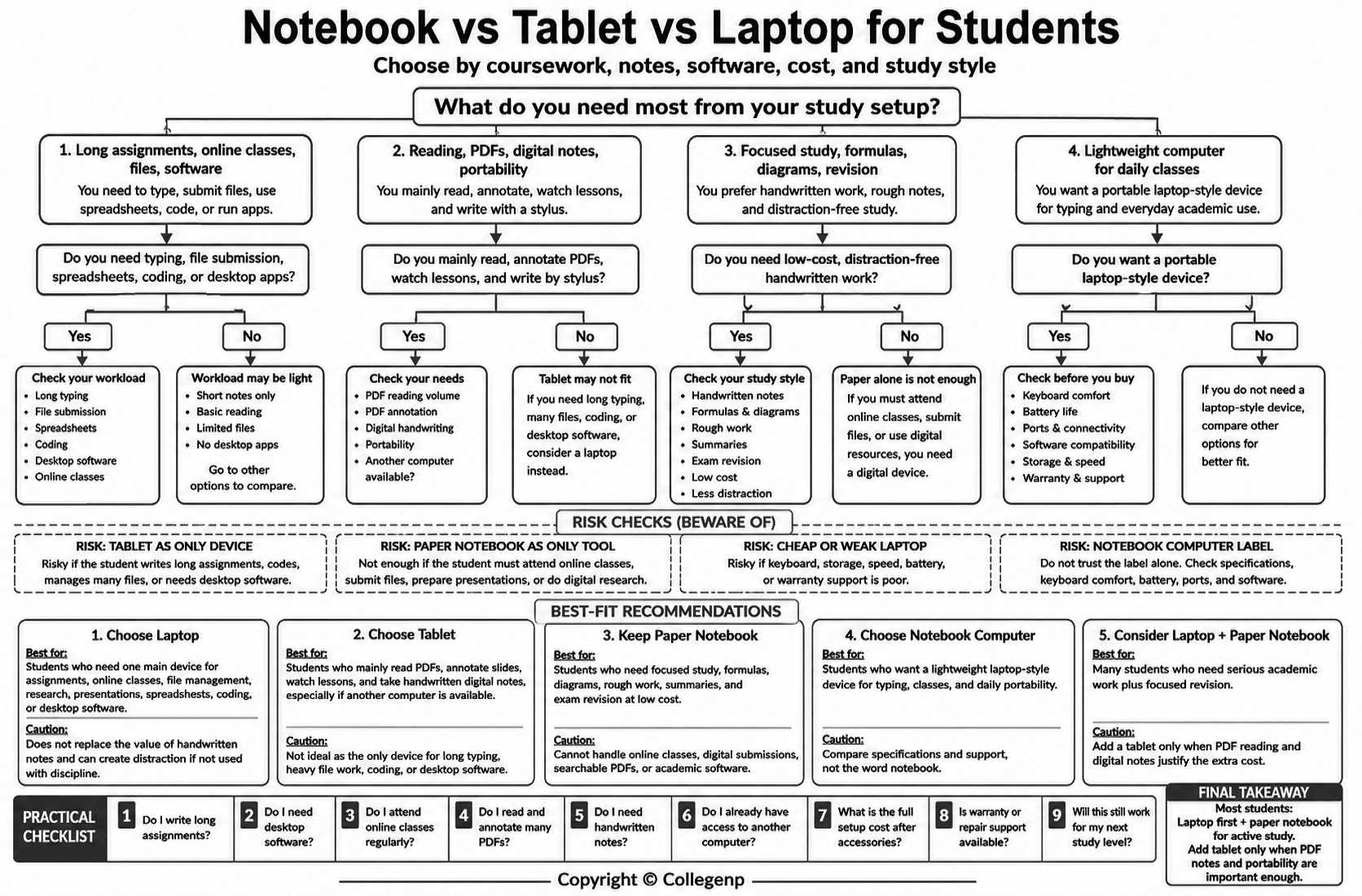
Choose a laptop if you need one main device for assignments, online classes, research, presentations, file submission, coding, spreadsheets, or software installation.
Choose a tablet if your main need is reading, PDF annotation, video lessons, and handwritten digital notes, especially if you already have access to a laptop or desktop.
Keep a paper notebook if you want a low-cost, distraction-free tool for lecture notes, formulas, summaries, diagrams, rough calculations, and revision.
Choose a notebook computer if you want a lightweight laptop, but compare specifications instead of trusting the name. Processor, memory, storage, keyboard comfort, battery life, ports, operating system, warranty, and software compatibility matter more than the word used by the seller.
Quick Verdict Table
| Student need | Best choice | Why it fits |
|---|---|---|
| Long assignments, reports, presentations | Laptop | Better keyboard, larger screen, stronger file handling |
| Handwritten digital notes and PDF annotation | Tablet | Stylus support, portability, easy reading |
| Low-cost study and exam revision | Paper notebook | No charging, no notifications, simple writing space |
| Lightweight computer for daily classes | Notebook computer | Usually a compact laptop; compare specifications |
| One device for most student work | Laptop or 2-in-1 laptop | Lower risk when course needs are unclear |
What Does “Notebook” Mean?
A paper notebook is the traditional copy, exercise book, or writing pad students use for notes, diagrams, formulas, summaries, and revision. It is non-digital and does not need power, software, storage, or internet access.
A notebook computer is different. In current product language, “notebook computer” is often used for a portable laptop-style computer. A notebook computer should therefore be judged like a laptop in most student buying decisions. The practical question is not whether the device is called a laptop or notebook. The practical question is whether it can complete the student’s academic workload.
Paper Notebook: Best for Focused Notes and Exam Revision
A paper notebook is simple, but it remains useful. Students can use it for lecture summaries, formulas, diagrams, rough calculations, mind maps, vocabulary practice, essay outlines, and revision plans.
Its main advantage is focus. A paper notebook has no notifications, apps, browser tabs, software updates, or battery alerts. For students who get distracted easily, this can make study time more controlled.
Research on note-taking supports a cautious point: handwritten notes may help students process ideas more actively when they summarize instead of copy. Mueller and Oppenheimer’s study on longhand note-taking found that laptop note-takers performed worse on conceptual questions than longhand note-takers in the study context. Harvard Graduate School of Education also explains that low-tech note-taking can help when students avoid shallow transcription and distraction.
This does not mean paper notes automatically improve learning. The method matters. The value comes from active work: summarizing, organizing, drawing, rewriting, and revising.
The limitation is clear. A paper notebook cannot join online classes, download resources, submit assignments, prepare slides, store searchable PDFs, or run software. It works best as part of a study system, not as the only tool for modern academic work.
Tablet: Best for PDFs, Digital Notes, and Portability
A tablet is strongest when a student reads a lot, marks PDFs, watches lessons, and wants handwritten digital notes. With a stylus, it can work like a digital notebook. Students can store textbooks, slides, scanned documents, lecture notes, and reference materials in one place.
For PDF-heavy courses, a tablet can be especially useful. Students can highlight text, write margin notes, draw diagrams, organize files by subject, and review materials without printing everything. It is also easy to carry, which helps students who travel daily or revise during short breaks.
The weakness is productivity. Long typing, complex formatting, spreadsheets, coding, presentation editing, folder management, and multitasking are usually easier on a laptop. A tablet with a keyboard can help, but it may still feel limited for long assignments and repeated file submissions.
The full cost also needs attention. A tablet may need a stylus, keyboard case, cover, charger, cloud storage, paid apps, or extra storage. A tablet can be the main device only when coursework is light, the school or college does not require desktop software, and the student is comfortable submitting files from tablet apps.
Laptop: Best for Assignments, Online Classes, and Software
A laptop is the safest one-device choice for most students because it covers the widest range of academic tasks. It has a physical keyboard, larger screen, desktop browser, file system, multiple-window support, and stronger compatibility with common student work.
Students who write reports, prepare presentations, use spreadsheets, attend online classes, research topics, code, manage files, or install course software usually benefit from a laptop. It is easier to rename documents, organize folders, attach files, print, connect external devices, and work across several tabs.
For Class 11/12, college, university, engineering, IT, business, management, design, media, and research-heavy courses, a laptop reduces risk. If a teacher asks for a formatted report, a presentation, a spreadsheet, or software installation, a laptop usually handles the task better than a tablet.
This does not mean every student needs an expensive laptop. For general study, students should prioritize reliability, enough memory for multitasking, SSD storage, a comfortable keyboard, a clear screen, a usable webcam, good battery life, and local warranty support. High-end graphics are relevant only for specific work such as gaming, 3D modeling, video editing, design, or some engineering tasks.
The drawback is portability and distraction. A laptop is heavier than a tablet and less natural for handwritten notes. It can also distract students if games, social media, videos, and unnecessary tabs remain open during study time.
Notebook Computer: Best When You Want a Lightweight Laptop
If “notebook” means notebook computer, treat it as a laptop-style device. A notebook computer may be smaller and easier to carry, but the buying decision should still be based on workload.
A lightweight notebook computer can be useful for students who travel daily, attend long classes, study in libraries, or need a portable typing device. It is usually more practical for writing assignments than a tablet and easier to carry than a large laptop.
However, very slim notebook computers may have fewer ports, limited upgrade options, smaller keyboards, weaker cooling, or higher repair costs. Before buying one, check whether it can run required software, whether the keyboard is comfortable for long typing, whether the battery is reliable, and whether warranty or repair support is available locally.
The key rule is simple: do not buy by category name. Buy by workload.
Best Choice by Student Type
| Student type | Most practical choice | Reason |
|---|---|---|
| School students | Paper notebook plus shared computer access | Supports handwriting, practice, and basic digital tasks |
| Class 11/12 students | Laptop plus paper notebook | Covers assignments, online classes, research, and revision |
| College and university students | Laptop first | Reduces risk for reports, presentations, files, and software |
| Engineering, IT, statistics, or design students | Laptop with course-required specifications | Technical software may not work well on tablets |
| Medical, nursing, law, humanities, or management students | Laptop first; tablet if reading is heavy | Laptop handles reports; tablet helps with PDFs and notes |
| Low-budget exam-focused learners | Paper notebook plus shared computer access | Keeps cost low while allowing digital work when needed |
What to Check Before Choosing
Check course requirements first. If your school, college, or university lists required software, operating systems, online exam tools, or minimum specifications, follow that requirement before general advice.
Check typing load. If you write long essays, lab reports, business reports, coding assignments, or research papers, a laptop is safer.
Check note style. If your classes involve diagrams, formulas, slides, and PDF markups, a tablet with stylus support can be useful. If you prefer focused handwritten revision, a paper notebook still works well.
Check total cost. A tablet may need a stylus, keyboard, case, storage, or paid apps. A laptop may need a bag, mouse, adapters, software, repair budget, or extra storage. Compare the full setup, not just the device price.
Check local service and warranty. Repair support, parts availability, and seller warranty handling can vary. A slightly less fashionable device with reliable service may be better than a premium device that is hard to repair.
What Would Change the Verdict?
A tablet becomes more suitable if the student already has reliable access to a laptop or desktop, reads many PDFs, takes handwritten digital notes daily, and does not need desktop software.
A laptop becomes necessary if the student writes long assignments, uses spreadsheets, codes, prepares presentations, handles many files, joins online classes regularly, or needs course-specific software.
A paper notebook becomes more important when the student is preparing for exams, practicing formulas, drawing diagrams, making summaries, or trying to reduce screen distraction.
A notebook computer becomes a strong choice when portability matters, but only if it still has enough performance, battery life, keyboard comfort, and repair support.
Who Should Avoid Each Option?
Avoid relying only on a paper notebook if your schoolwork requires online classes, typed assignments, file submissions, presentations, or research.
Avoid using a tablet as the only device if you write long assignments, code, manage many files, use spreadsheets, or need desktop software. ISTE’s education-technology discussion on tablets and laptops also warns against assuming tablets can replace laptops in every learning environment.
Avoid buying a laptop without checking course requirements, keyboard comfort, screen quality, battery life, memory, storage, and warranty. A slow or uncomfortable laptop can waste time every day.
Avoid buying a notebook computer only because it is slim. Portability is useful, but weak performance or poor service support can become a long-term problem.
Common Mistakes and Decision Checklist
Avoid five common mistakes: buying a tablet only because it looks modern, buying the cheapest laptop without checking usability, ignoring accessory costs, assuming handwriting or typing is automatically better, and copying another student’s choice without checking your own workload.
Before choosing, ask whether you write long assignments, need desktop software, use PDFs heavily, already have access to another computer, can afford the full setup after accessories, and have reliable warranty or repair support. Also verify any official school, college, or course requirement before buying.
Final Recommendation
If you can buy only one main device for general student use, choose a laptop. It gives the strongest balance of typing, online classes, assignments, research, file management, and software compatibility. It is not perfect for handwritten notes, but it covers the widest academic risk.
Choose a tablet if your main need is reading, PDF annotation, handwritten digital notes, and portability, or if you already have reliable access to a laptop or desktop. Keep a paper notebook even if you use digital tools because it remains useful for focused thinking, formulas, diagrams, rough work, planning, and revision.
Choose a notebook computer if you want a lightweight laptop, but judge it by specifications, keyboard comfort, battery life, repair support, and required software. For many learners, the practical setup is a laptop for serious academic work and a paper notebook for active study. Add a tablet only when digital notes, PDFs, and portability are important enough to justify the extra cost.
You can also read - Laptop vs Tablet for Students: Which One Should You Choose?






Comments 0
No comments yet. Be the first to start the conversation.