



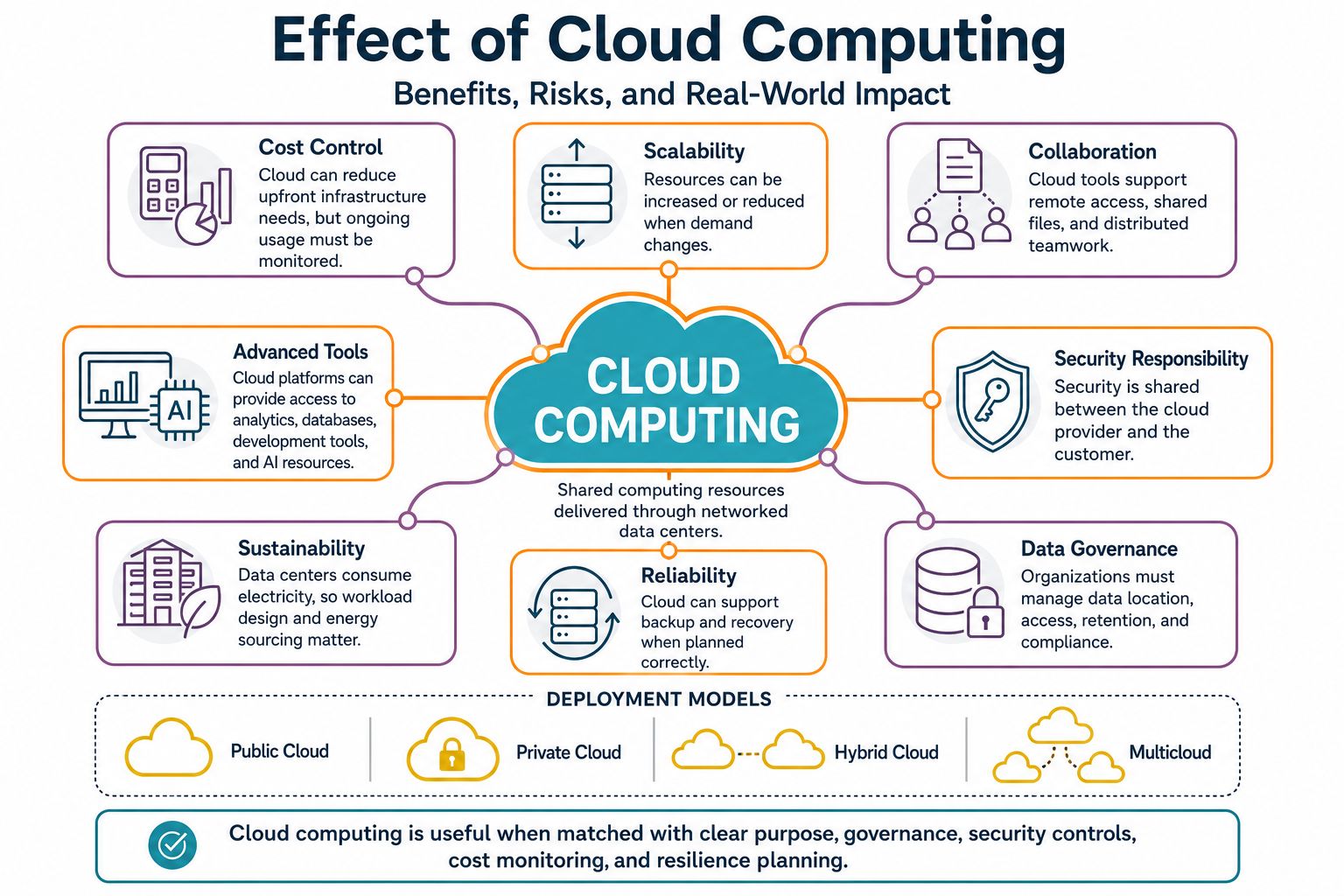
Cloud computing has changed how people store files, run applications, build software, manage data, and deliver digital services. The effect of cloud computing is that computing resources no longer have to sit only inside one office, school, hospital, factory, or government building. They can be delivered through networked data centers and accessed when needed.
This shift has clear benefits. Cloud services can reduce upfront infrastructure needs, improve access to tools, support remote collaboration, help digital services scale with demand, and make advanced computing resources easier to use. It also creates risks that should not be ignored: cost sprawl, shared security responsibility, outage exposure, vendor dependence, data-governance challenges, and energy demand from data centers.
Cloud computing is not a perfect answer for every workload. It is also not unsafe by default. Its value depends on workload fit, system design, governance, technical skills, provider choice, internet reliability, legal requirements, and ongoing review.
Answer Summary:
Cloud computing affects users and organizations by moving computing resources from mainly local systems to on-demand networked services. It can improve speed, access, collaboration, backup, and flexibility. Its disadvantages include cost growth without governance, shared security duties, downtime risk, vendor lock-in, data-sovereignty concerns, and environmental pressure from data-center electricity use.
Table of Content
- What Cloud Computing Means
- Why Cloud Computing Matters Now
- Positive Effects of Cloud Computing
- Limitations, Risks, and Criticisms
- How Cloud Computing Affects Different Readers
- Cloud Computing vs Traditional IT
- Practical Checklist Before Using Cloud Services
- Conclusion
Key Takeaways:
-
Cloud computing changes how computing power, storage, software, and platforms are delivered.
-
Its benefits depend on planning, governance, skills, and workload fit.
-
Security is shared between provider and customer, not handled by the provider alone.
-
Cloud spending can rise if usage is not monitored.
-
Data location, privacy, compliance, and exit planning matter.
-
Data-center electricity demand is now part of the cloud discussion.
-
Cloud and traditional IT often work together rather than replacing each other in every case.
What Cloud Computing Means
Cloud computing means using shared computing resources through a network instead of relying only on local hardware and software. The National Institute of Standards and Technology definition of cloud computing describes it as on-demand network access to a shared pool of configurable resources such as networks, servers, storage, applications, and services that can be rapidly provisioned and released with minimal management effort.
For readers who need a simpler starting point, Collegenp’s guide on What Is Cloud Computing can support the basic definition before moving into effects and trade-offs.
The Basic Cloud Model
The key point is not simply that data is stored online. The key point is that computing capacity can be requested, measured, expanded, reduced, and released more flexibly than in many traditional IT environments.
Cloud computing usually includes five core characteristics: on-demand self-service, broad network access, resource pooling, rapid elasticity, and measured service. These characteristics explain why cloud systems can support services that need flexible access, variable capacity, and usage-based measurement.
SaaS, PaaS, and IaaS
Cloud services are commonly grouped into three service models.
Software as a Service, or SaaS, gives users finished applications. Examples include email, office tools, customer management systems, accounting platforms, and collaboration tools.
Platform as a Service, or PaaS, gives developers an environment for building, testing, and deploying applications without managing every layer of infrastructure.
Infrastructure as a Service, or IaaS, provides computing power, storage, and networking resources that organizations configure for their own workloads.
These models matter because they change responsibility. A SaaS user has different duties from an organization managing virtual machines through IaaS.
Public, Private, Hybrid, and Multicloud
Cloud deployment also varies. Public cloud services run on infrastructure shared across many customers. Private cloud is dedicated to one organization. Hybrid cloud combines cloud and on-premises systems. Multicloud uses services from more than one provider.
These choices affect cost, control, compliance, resilience, and technical complexity. A small business using a cloud accounting tool, a university using online learning systems, and a bank running regulated workloads may all use cloud computing, but their responsibilities are not the same.
Why Cloud Computing Matters Now
Cloud computing matters because digital services are central to work, education, public services, software development, and communication. Many organizations use cloud systems for email, file storage, analytics, finance, customer support, backup, databases, and remote collaboration.
Adoption is not equal across the world, so regional figures should not be treated as global facts. Eurostat’s cloud computing statistics reported that 52.74% of EU enterprises used paid cloud computing services in 2025, mostly for email, office software, and file storage. The same dataset shows higher use among larger enterprises than smaller ones.
Artificial intelligence has also increased attention on cloud infrastructure. Many AI services rely on large data centers, specialized computing resources, and high-volume data processing. This connects cloud computing to wider debates about productivity, energy use, data governance, and economic concentration.
Positive Effects of Cloud Computing
Cloud computing can make technology easier to access, faster to deploy, and more practical for distributed users. These benefits are strongest when organizations use the cloud for clear needs rather than adopting it as a trend.
Lower Upfront Infrastructure Burden
One visible effect of cloud computing is the shift from buying and maintaining physical infrastructure to using services as needed. An organization that once needed to purchase servers, storage devices, backup systems, network equipment, and cooling capacity can rent computing resources from a provider.
This can reduce upfront infrastructure pressure and shorten the time needed to launch a service. It can also help smaller teams use tools that would be difficult to build alone.
The caution is important. Lower upfront cost does not guarantee lower long-term cost. Cloud bills can rise when resources are oversized, duplicated, left running after testing, or spread across teams without clear ownership. The cost benefit appears when usage is monitored and matched to actual need.
Faster Scaling and Deployment
Cloud computing can make it easier to adjust capacity when demand changes. A business preparing for seasonal traffic, an education platform supporting more students during exam periods, or a media service handling sudden demand can add capacity faster than it could through hardware procurement alone.
This speed also changes how technical teams work. Developers can create test environments, automate deployment, monitor applications, and release updates with less infrastructure delay. That speed is useful only when paired with testing, security review, monitoring, and rollback planning.
Better Collaboration and Remote Access
Cloud-based tools have made collaboration easier for many teams. Shared documents, project platforms, video meetings, learning systems, and cloud storage allow people to work from different locations.
For education, the effect can be practical. Students can access materials outside the classroom. Teachers can share assignments and feedback online. Institutions can manage digital records more efficiently. These benefits still depend on reliable internet access, device availability, privacy rules, and digital skills.
Students considering academic pathways related to cloud systems may also find Collegenp’s BSc IT Cloud Computing page useful as related reading.
Access to Advanced Tools
Cloud platforms can make advanced tools easier to use. Analytics, managed databases, development platforms, cybersecurity tools, content delivery networks, and computing resources can be accessed without building every layer from scratch.
This does not mean cloud tools automatically create better decisions. A cloud analytics platform still depends on accurate data, skilled users, responsible governance, and clear questions. Cloud computing improves access; it does not replace judgment.
Backup, Continuity, and Resilience
Cloud computing can support backup, disaster recovery, and continuity planning. Data can be stored across locations, systems can be restored more quickly, and services can be designed to withstand some hardware failures.
This benefit depends on design. A poorly planned cloud system can still fail. If an organization depends on one region, does not test backups, or assumes the provider handles every recovery task, it may remain exposed during outages.
Limitations, Risks, and Criticisms
The disadvantages of cloud computing are not reasons to reject it in every case. They are issues that must be managed before cloud services become a dependable part of work, study, business, or public service.
Cost Sprawl and Usage Waste
Cloud computing changes how costs appear. Traditional IT often involves planned purchases and visible hardware investment. Cloud spending can grow through smaller charges across teams, regions, tools, and projects.
Common causes include idle virtual machines, oversized storage, duplicated environments, unmanaged backups, unnecessary data movement, and test services that are never removed. Cost governance should be part of cloud design from the beginning. Finance teams and technical teams need a shared view of usage, ownership, and business value.
Security and Shared Responsibility
Cloud security is shared between provider and customer. Microsoft’s shared-responsibility guidance states that customers retain responsibility for areas such as data, endpoints, accounts, and access management, while the division of other duties varies across IaaS, PaaS, and SaaS.
This is why the statement “cloud is secure” is incomplete. A cloud system can be secure when it is configured, monitored, and governed properly. It can also become risky when permissions are too broad, storage is misconfigured, logs are ignored, or sensitive data is placed in the wrong environment.
ENISA’s Cloud Computing Risk Assessment describes cloud computing as having both security benefits and security risks, with practical recommendations for users. Readers who want a broader skill context can connect this topic with Collegenp’s guide on Cybersecurity Course, Skills, Jobs and Scope.
Downtime and Provider Dependence
Cloud platforms can be reliable, but they are not immune to outages. When a major provider, region, identity service, or network route has a problem, many dependent services can be affected at once.
This creates a different type of risk from local infrastructure. The customer may carry less maintenance burden but depend more on external platforms, internet connectivity, provider status, and service-level agreements. Critical workloads need backup, failover, monitoring, incident response, and exit planning.
Vendor Lock-In and Portability
Cloud providers offer managed services that reduce technical work. These tools can be useful, but they may also create dependence. A team that builds heavily around one provider’s database, messaging service, identity tool, or serverless platform may face difficulty moving later.
Lock-in is not necessarily a reason to avoid managed services. It is a trade-off. Organizations should decide which systems need portability and which can accept provider-specific features because the operational benefit is worth it.
Data Governance and Sovereignty
Cloud computing can move data across systems, regions, providers, and third-party tools. That makes governance essential.
Organizations need to know what data they collect, where it is stored, who can access it, how long it is retained, how it is encrypted, and which laws or contracts apply. This is especially important for personal data, education records, health records, financial information, government data, and intellectual property.
Cloud services can support compliance, but they do not remove accountability from the organization using them.
Environmental Impact of Data Centers
Cloud computing depends on data centers and networks that consume electricity and require cooling. The environmental effect is complex.
Large data centers can be more efficient than many small, poorly managed server rooms when they are well designed and responsibly powered. At the same time, demand for cloud services, AI workloads, storage, and data transfer can increase total electricity use.
The International Energy Agency projects in its Energy and AI report that global electricity consumption for data centers could double to around 945 TWh by 2030 in its Base Case, representing just under 3% of global electricity consumption in 2030. This does not mean every cloud service has the same environmental cost. It does show why workload design, hardware use, cooling, grid mix, and energy sourcing matter.
How Cloud Computing Affects Different Readers
Cloud computing affects different groups in different ways. The same technology can be useful for one reader and risky for another if the purpose, skills, or controls are weak.
Businesses
For businesses, cloud computing can shorten the path from idea to service. It can support online sales, remote work, customer support, analytics, software delivery, backup, and collaboration.
The risk is weak governance. A business that moves to the cloud without clear ownership, access rules, backup plans, and cost monitoring may replace one set of IT problems with another.
Students and Education
For students and educators, cloud computing can widen access to learning materials, shared documents, coding platforms, and digital classrooms. It can also raise questions about privacy, distraction, unequal internet access, and dependence on third-party platforms.
The effect is strongest when cloud tools support a clear learning purpose rather than becoming technology for its own sake.
Developers and IT Teams
For developers and IT teams, cloud computing can improve speed and experimentation. Teams can create development environments, automate deployment, use managed databases, monitor applications, and adjust resources as demand changes.
The trade-off is complexity. Teams need skills in cloud architecture, security, automation, cost management, identity, networking, and observability. Career-minded readers may use Collegenp’s How to Start a Career in Cloud Computing as a related next step.
Governments and Public Services
For governments, cloud computing can support digital public services, shared platforms, data exchange, and service continuity. It also raises higher-stakes questions about procurement, national data rules, vendor control, cybersecurity, accessibility, public accountability, and continuity of essential services.
Public-sector cloud decisions should be guided by legal duties, service criticality, data sensitivity, and long-term control, not only by speed or cost.
Cloud Computing vs Traditional IT
Cloud computing is not simply more suitable than traditional IT in every case. It changes the trade-offs. Traditional on-premises infrastructure may offer direct control and local operation. Cloud computing may offer faster scaling, managed services, and distributed access.
| Area | Cloud Computing | Traditional On-Premises IT |
|---|---|---|
| Cost pattern | Lower upfront infrastructure burden, but ongoing usage bills need monitoring | Higher upfront purchase and maintenance costs, often more predictable after purchase |
| Scaling | Capacity can be added or reduced more quickly | Scaling usually requires hardware planning and procurement |
| Control | Shared control with provider; depends on service model | More direct control over infrastructure |
| Security | Provider and customer share responsibilities | Organization carries most operational responsibility |
| Resilience | Can support backup and geographic redundancy if designed well | Depends on local infrastructure and disaster-recovery investment |
| Suitable use | Variable workloads, distributed teams, digital services, fast development | Stable workloads, controlled environments, special compliance or latency needs |
Hybrid approaches are common because different workloads have different needs. A company may keep sensitive legacy systems on-premises while using cloud services for collaboration, backup, analytics, or customer-facing applications.
Practical Checklist Before Using Cloud Services
Cloud decisions should begin with the problem being solved, not with the assumption that cloud is the next step for every system.
Workload and Data Questions
Before adopting or expanding cloud services, ask:
-
What problem is the cloud service supposed to solve?
-
Which data is sensitive, regulated, or business-critical?
-
Who owns security configuration, access control, backups, and monitoring?
-
What happens if the provider, region, identity service, or internet connection is unavailable?
-
How will spending be tracked by team, project, and business value?
-
Which tools create useful managed-service value?
-
Which tools create unnecessary lock-in?
-
Can data be exported in a usable form if the organization changes provider?
-
How often will permissions, logs, backup tests, and cost reports be reviewed?
Governance Questions
Cloud governance should be practical rather than decorative. A useful governance process identifies who can create resources, who approves sensitive workloads, who reviews costs, who handles incidents, and who verifies backup and recovery plans.
Governance also needs documentation. Without records of ownership, data location, access rules, and recovery procedures, the organization may not understand its cloud exposure until a bill, audit, outage, or security incident reveals the gap.
Conclusion
The effect of cloud computing is broad because it changes both technology and decision-making. It can reduce infrastructure barriers, improve collaboration, speed up software development, support backup, and make advanced tools available to more users.
The same shift creates risks. Cost can grow without discipline. Security can fail if customers misunderstand their responsibilities. Outages can affect many dependent services. Vendor dependence can limit future flexibility. Data governance and environmental impact need careful attention as cloud and AI infrastructure expand.
The balanced conclusion is clear: cloud computing is useful when it is matched to the right workload, managed with clear ownership, supported by security controls, monitored for cost, and reviewed for resilience. It is weakest when adopted without purpose, governance, or risk review.






Comments 0
No comments yet. Be the first to start the conversation.