




AI does not automatically make you less capable. It can weaken ability when it replaces practice, reasoning, memory, and judgment. It can support ability when it gives feedback, questions, examples, and review while the person remains responsible for the thinking.
This question matters because AI is now part of studying, writing, coding, searching, office work, and creative projects. Stanford HAI’s 2026 AI Index reports that organizational AI adoption reached 88%, and that four in five university students now use AI systems that generate content. The issue is no longer whether people will use AI. The issue is whether they use it in ways that protect independent skill.
Answer Summary:
AI makes people less capable when it removes the effort that builds skill. It can make people more capable when it supports practice, feedback, questioning, checking, and revision. The safest habit is simple: attempt the task first, use AI for support second, verify important claims, and then explain the result without the tool.
Table of Content
- What does “less capable” mean?
- How AI can weaken human ability
- How AI can support skill growth
- The line between assistant and substitute
- How students should use AI
- How workers and creators should use AI
- A simple before, during, and after framework
- Final answer
Key Takeaways:
-
AI weakens skill when it replaces practice.
-
AI supports skill when it gives feedback after effort.
-
Fluent output is not the same as understanding.
-
Cognitive offloading is useful for low-value tasks but risky for core learning.
-
Students should attempt work before asking AI for help.
-
Workers need stronger checking habits.
-
The best test is whether you can explain the result without AI.
What does “less capable” mean?
Being less capable means becoming weaker at doing, explaining, judging, or repeating a task without outside support. A person can produce better-looking work with AI and still be less prepared to perform the underlying skill alone.
Capability includes more than speed. It includes accuracy, understanding, memory, transfer, judgment, and confidence without the tool. This difference matters in school, work, and creative practice.
A student may submit a polished essay but struggle to explain the argument. A worker may create a strong-looking report but fail to defend the assumptions. A beginner programmer may complete an exercise with AI help but fail to debug a similar problem later.
In each case, the output looks stronger than the person’s independent performance. That does not mean AI use is harmful in every case. It means output quality and skill growth are not the same thing.
For related reading on study habits, see Collegenp’s article on effective learning strategies for college students.
How AI can weaken human ability
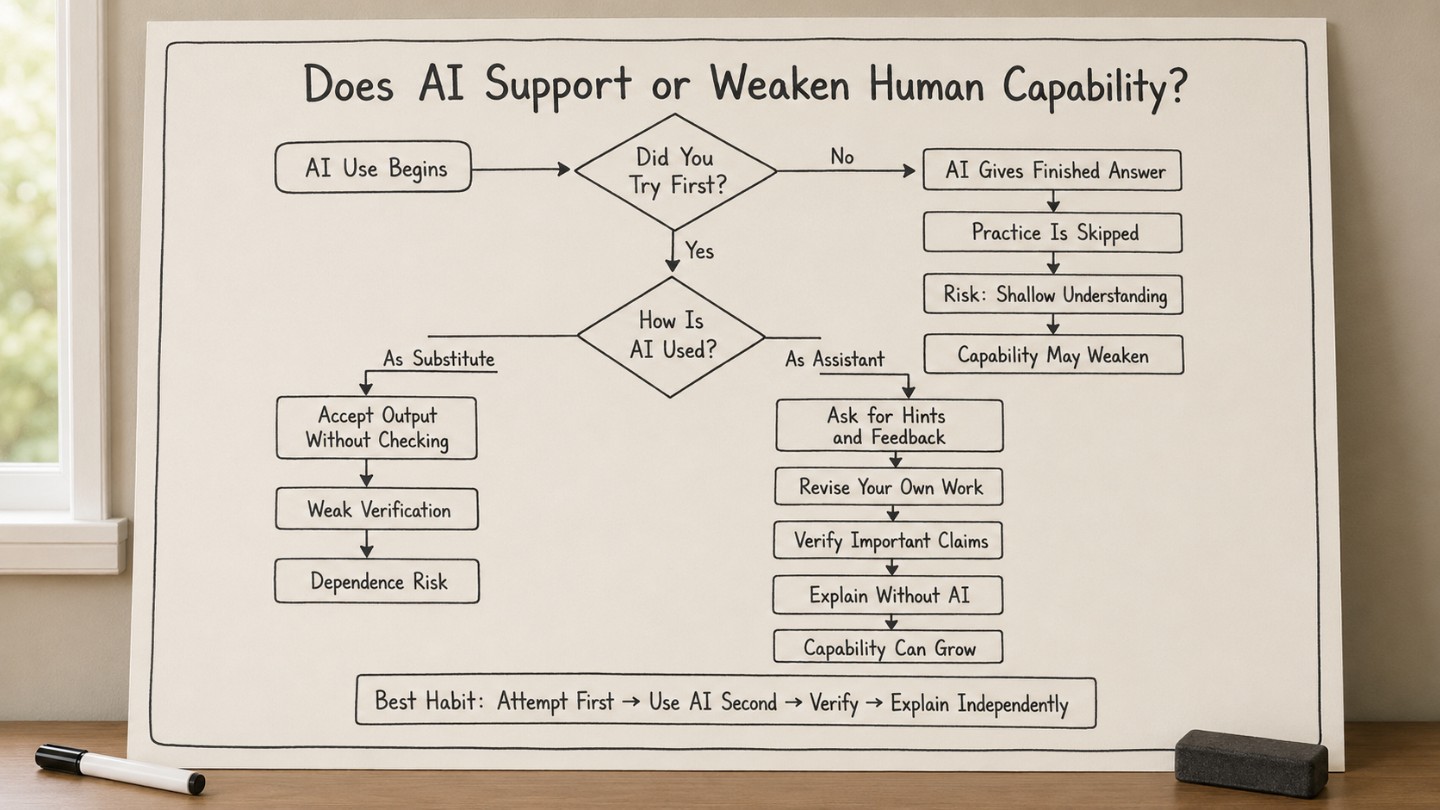
AI can weaken capability when it removes the mental effort needed to build skill. The main risks are reduced practice, shallow understanding, overconfidence, and weak verification.
Cognitive offloading can reduce practice
Cognitive offloading means using an external tool or action to reduce the mental demand of a task. Risko and Gilbert describe it as a normal part of human thinking, not a problem created only by AI.
Cognitive offloading is not automatically bad. Calendars, notebooks, calculators, search engines, and checklists all reduce mental load. They can free attention for higher-value work.
The risk appears when the offloaded task is the skill being learned.
If the goal is to learn writing, asking AI to write the full essay first removes planning and drafting practice. If the goal is to learn reasoning, asking AI for the final answer removes the struggle of forming and testing a line of thought. If the goal is to learn research, accepting AI summaries without reading sources weakens evidence judgment.
Gerlich’s 2025 study in Societies examined AI tool use, cognitive offloading, and critical thinking across 666 participants. The study reported a negative relationship between frequent AI tool use and critical thinking performance, with cognitive offloading as a mediating factor. This should not be stretched into a claim that AI causes permanent decline. It supports a narrower warning: when people outsource thinking too often, they get fewer chances to practice thinking.
Fluent answers can create overconfidence
AI often writes in a confident, organized style. That fluency can make weak answers feel trustworthy.
Microsoft Research’s 2025 CHI paper surveyed 319 knowledge workers and collected 936 examples of AI use in work tasks. The authors found that higher confidence in AI was associated with less critical thinking, while higher self-confidence was associated with more critical thinking. They also found that AI shifts critical thinking toward verification, response integration, and task stewardship.
That distinction matters. AI does not remove the need for thinking. It moves thinking into new parts of the work.
Instead of asking only, “Can AI produce an answer?” ask:
-
Is the answer accurate?
-
What evidence supports it?
-
What assumptions are hidden?
-
What did the tool leave out?
-
What would a subject expert challenge?
-
Can I explain the result without reading the AI response?
A person who asks those questions is still using judgment. A person who accepts the output without checking is taking on more risk.
Short-term performance can hide weak learning
AI can help users finish tasks faster while leaving independent skill underdeveloped. This is the gap between performance and learning.
In education, that gap matters because learning depends on retrieval, explanation, correction, and transfer. If AI gives the answer before the student tries, the student may lose the practice that helps knowledge become usable later.
A student who uses AI to check a completed solution is still doing mental work. A student who copies an AI solution without understanding it is not.
How AI can support skill growth
AI can support capability when it is used for feedback, guided practice, explanation, and review. The key condition is that the person remains active.
AI can act as a coach
A useful coach does not simply hand over answers. A coach asks questions, gives hints, points out mistakes, and asks the learner to try again.
Students can use AI in this way by asking:
-
“Give me one hint, not the full answer.”
-
“Ask me questions until I can explain this.”
-
“Find the weak point in my paragraph.”
-
“Create five practice questions from this topic.”
-
“Check my answer and tell me what I missed.”
-
“Give a counterargument to my claim.”
These prompts keep the learner involved. They use AI to increase practice rather than remove it.
For a broader education-focused view, see Collegenp’s article on AI in teaching and learning effects and limits.
Structured AI tutoring can help under the right design
AI tutoring evidence is promising, but design matters. A 2025 Scientific Reports randomized controlled study found that students using a custom AI tutor learned more in less time than students in an in-class active learning comparison. The study also stressed that the tutor followed research-based teaching principles rather than simple answer delivery.
That point is essential. A structured tutor that asks questions and guides practice is different from a tool that gives full answers immediately. The first can support learning. The second can reduce learning practice.
The responsible reading is clear: AI can support learning, but not every use of AI is good learning.
The line between assistant and substitute
AI is an assistant when the human keeps responsibility for the goal, reasoning, evidence, judgment, and final explanation. AI becomes a substitute when the human accepts output without understanding or checking it.
A helpful test is to ask: “Which part of the work did AI do?”
Lower-risk uses include:
-
turning notes into a checklist
-
finding unclear wording
-
creating practice questions
-
suggesting counterarguments
-
comparing two drafts
-
explaining a concept in simpler language
-
checking whether a claim needs a source
Higher-risk uses include:
-
asking AI to write the full answer before you think
-
copying AI responses into homework
-
accepting sources without checking them
-
using AI to replace reading
-
using AI for decisions where accuracy, fairness, or safety matters
-
submitting work you cannot explain
The dividing line is not the tool. The dividing line is whether the human still does the learning and judgment.
How students should use AI
Students should use AI after making a first attempt. This protects the effort that builds understanding.
For homework
A safer sequence is:
-
Read the assignment.
-
Write what you already know.
-
Try the first step.
-
Ask AI for a hint or feedback.
-
Revise your own answer.
-
Close the tool and explain the answer from memory.
This sequence keeps practice in place.
For writing
Students should avoid asking AI to write the essay first. A better use is to draft first, then ask AI to identify unclear claims, missing evidence, weak transitions, or counterarguments.
Good prompts include:
-
“What is the weakest claim in this draft?”
-
“Which sentence needs evidence?”
-
“Where does the logic jump too quickly?”
-
“What would a careful reader question?”
These prompts make the student revise, not copy.
For exams and long-term learning
AI is less useful if it becomes a shortcut around retrieval. Students should use it to create practice tests, not only summaries.
A strong study prompt is: “Quiz me one question at a time. Do not give the answer until I respond.”
If you cannot answer without the tool, you are not ready yet.
Students looking for practical study use cases can read Collegenp’s article on AI tools to help university students study smarter.
How workers and creators should use AI
Workers and creators should treat AI as support for drafting, checking, and exploring alternatives. They should not treat it as a replacement for accountability.
For workers, the valuable skill is not pressing a button. It is knowing what to ask, what to reject, what to verify, and what to adapt.
Use AI for lower-risk support
AI can help with:
-
summarizing meeting notes for review
-
drafting routine text for editing
-
comparing options
-
preparing questions for a meeting
-
identifying missing assumptions
-
translating a draft for human review
-
turning rough notes into a task list
These uses save time while keeping judgment with the person.
Be careful with higher-risk work
AI output needs stronger review when the work involves:
-
student evaluation
-
hiring
-
health information
-
legal or policy decisions
-
financial decisions
-
public communication
-
safety-related instructions
-
sensitive personal data
This article is informational and does not provide legal, medical, or financial advice. In high-stakes contexts, AI output should be reviewed by a qualified person.
Creators need taste and ownership
Creators can use AI for brainstorming, outlining, revision, and checking blind spots. The risk is sameness. If the first AI answer is accepted, the work can lose voice, specificity, and judgment.
A better creative habit is to use AI after you have a direction. Ask it to challenge the idea, find weak spots, suggest alternatives, or test the audience fit. Keep final taste and responsibility with the creator.
A simple before, during, and after framework
The safest AI habit is simple: think before AI, use AI as a coach during the task, and explain the result after AI.
Before AI: attempt first
Do one useful action before using AI:
-
write a rough answer
-
solve the first step
-
list what you know
-
mark what confuses you
-
write an outline
-
predict the answer
-
define what a good answer needs
This protects learning effort.
During AI: ask for support, not replacement
Use prompts that keep you active:
-
“Give one hint.”
-
“Ask me a question.”
-
“Check my reasoning.”
-
“Find missing evidence.”
-
“Challenge my conclusion.”
-
“Explain one mistake.”
-
“Give practice problems.”
Avoid prompts that ask AI to finish the task before you have tried.
After AI: explain without the tool
Close the tool and test yourself:
-
Can I explain the answer?
-
Can I defend the source?
-
Can I name the weak point?
-
Can I repeat the method?
-
Can I apply it to a new example?
-
Can I teach it to someone else?
If the answer is no, AI helped you produce output, but the skill still needs practice.
Final answer
AI does not make people less capable by default. It changes where effort happens.
When AI replaces practice, memory, judgment, and verification, it can weaken independent capability. When AI supports effort through feedback, questions, examples, and review, it can help people learn and work better.
The practical rule is: attempt first, use AI second, verify important claims, and explain afterward. If you can still think, judge, and perform without the tool, AI is acting as support. If you cannot, the tool has become a substitute.







Comments 0
No comments yet. Be the first to start the conversation.