



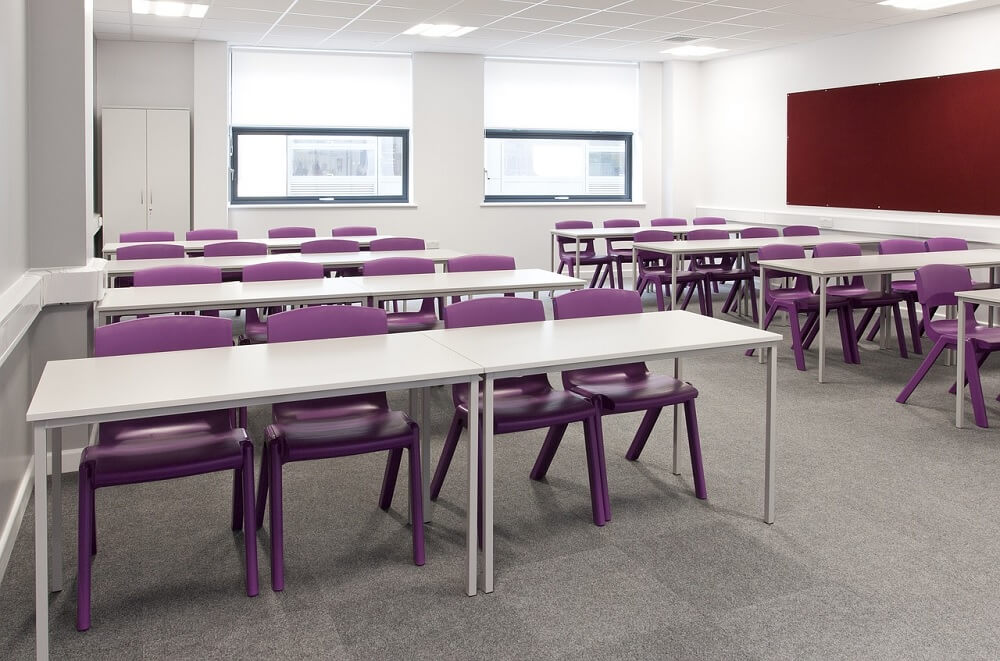
Improving a classroom does not require replacing every desk, device, or teaching tool. A more effective approach is to identify the problems affecting teaching and learning, repair what still works, and invest in a small number of items that will be used regularly.
A limited budget makes careful planning especially important. Schools should consider educational value, safety, accessibility, maintenance, and long-term cost before purchasing equipment. The goal is not to create a technology-heavy classroom but to provide teachers and students with reliable tools that support daily learning.
Table of Content
- Begin With a Classroom Equipment Audit
- Set Priorities Based on Learning Needs
- Repair, Reorganize, and Reuse First
- Consider the Total Cost, Not Only the Purchase Price
- Buy Used or Refurbished Equipment Carefully
- Choose Low-Cost Upgrades With Regular Use
- Use Free and Existing Digital Resources
- Create Simple Materials In-House
- Seek Grants and Donations Through Approved Channels
- Approach Fundraising With Care
- Ask Students What Helps Them Learn
- Upgrade in Small Stages
- Plan for Storage, Maintenance, and Responsibility
- Measure Whether the Upgrade Worked
- Final Considerations
Begin With a Classroom Equipment Audit
Before buying anything, review what the classroom already has. Some equipment may be underused, stored elsewhere, or repairable at a reasonable cost.
Record each item and classify it as:
-
Working and regularly used
-
Working but rarely used
-
In need of repair
-
Unsafe or unsuitable
-
Missing but necessary
The review should include furniture, boards, storage, lighting, electrical outlets, computers, projectors, speakers, charging equipment, science materials, and accessibility tools.
Ask teachers and students which problems affect lessons most often. A difficult-to-read board, unreliable internet connection, broken storage unit, or lack of charging points may be more disruptive than the absence of a new digital device.
Set Priorities Based on Learning Needs
Create a ranked list instead of a general wish list. Begin with equipment that affects safety, access, and everyday teaching.
A practical order of priority is:
-
Safety-related repairs and replacements
-
Essential furniture and writing surfaces
-
Accessibility requirements
-
Frequently used teaching tools
-
Storage and organization
-
Technology that supports a defined learning activity
-
Optional decorative or specialist items
Each proposed purchase should answer a clear question: What problem will this solve?
For example, a projector may be useful when teachers regularly use visual demonstrations. It may offer limited value if the room cannot be darkened, the wall is unsuitable, or the school lacks reliable electricity. Equipment should match the conditions in which it will be used.
Schools planning digital purchases can review effective ways to use technology in the classroom before deciding which tools are necessary.
Repair, Reorganize, and Reuse First
Low-cost improvements often begin with better use of existing resources.
Possible actions include:
-
Repairing chairs, desks, shelves, and board fittings
-
Replacing worn cables, plugs, or remote controls through qualified personnel
-
Moving unused equipment between classrooms
-
Reorganizing storage so materials are easier to find
-
Updating older computers when this is technically and financially reasonable
-
Cleaning projector filters and maintaining other devices according to manufacturer guidance
-
Creating a booking system for equipment shared by several classes
A shared device may be more practical than purchasing several low-quality versions. For example, one reliable projector or document camera can serve multiple classrooms when the school has a clear timetable and secure storage.
Electrical repairs, structural work, and equipment involving heat, chemicals, or moving parts should be handled by qualified staff. Cost-saving measures should never reduce safety.
Consider the Total Cost, Not Only the Purchase Price
The cheapest item is not always the least expensive over time. Before buying, calculate the likely cost of ownership.
This may include:
-
Delivery and installation
-
Replacement parts
-
Batteries or charging equipment
-
Software subscriptions
-
Internet use
-
Printing supplies
-
Repairs and maintenance
-
Staff training
-
Security and storage
-
Disposal at the end of the item’s useful life
A low-priced printer, for example, may require expensive ink. A discounted tablet may no longer receive security updates. A projector may need costly replacement lamps.
Compare warranties, repair options, expected lifespan, and compatibility with equipment the school already owns. A smaller number of dependable items may provide better value than several products that are difficult to maintain.
Buy Used or Refurbished Equipment Carefully
Used equipment can reduce costs, particularly for desks, shelves, cabinets, monitors, and selected electronic devices. However, every item should be inspected before purchase or acceptance.
For furniture, check:
-
Stability
-
Sharp edges
-
Loose fittings
-
Rust or structural damage
-
Suitability for the students’ age and size
-
Ease of cleaning
For electronic equipment, confirm:
-
Working condition
-
Battery health
-
Availability of chargers and accessories
-
Compatibility with current software
-
Remaining security support
-
Warranty or return arrangements
-
Availability of replacement parts
Avoid devices that cannot receive essential security updates or require unsupported software. Any device that will store student information must meet the school’s privacy and security requirements.
Schools should also consider why safe digital tools are essential for modern classrooms before accepting donated or second-hand technology.
Choose Low-Cost Upgrades With Regular Use
Some modest purchases can improve classroom organization and lesson delivery without requiring major investment.
Useful options may include:
-
A clear, durable writing board
-
Portable whiteboards for group work
-
Document organizers and labelled storage boxes
-
Extension leads with suitable protection, installed and used according to safety rules
-
A basic speaker for approved audio materials
-
Headphones for shared devices
-
A document camera or secure phone stand for demonstrations
-
Reusable learning cards and display materials
-
Curtains or blinds to control glare
-
Cable organizers
-
Visual timers
-
Accessible seating or writing supports
The right choice depends on the subject, age group, classroom layout, and teaching method. Equipment should not be purchased simply because it is common in other schools.
Use Free and Existing Digital Resources
A classroom technology upgrade does not always require new hardware. Schools may be able to make better use of devices they already have by selecting suitable software and digital materials.
Before introducing a platform, check:
-
Whether it serves a clear teaching purpose
-
Whether a free version is sufficient
-
What student data it collects
-
Whether advertisements appear
-
Whether students need personal accounts
-
Whether it works on existing devices
-
Whether it supports accessibility features
-
Whether teachers need training
-
Whether an offline alternative is available
Free software can still create privacy, security, or long-term access concerns. School approval should be obtained before teachers ask students to register for an external service.
A review of technology tools for teaching and learning can help schools compare categories of tools rather than purchasing products without a teaching plan.
Create Simple Materials In-House
Teachers and students can produce selected classroom materials using affordable supplies. Suitable projects may include:
-
Subject labels
-
Vocabulary cards
-
Reading trackers
-
Reusable number lines
-
Classroom maps
-
Display boards
-
Book organizers
-
Simple models made from clean, safe materials
These projects can support creativity and classroom ownership when they are connected to a lesson. They should not require families to purchase materials or place students in contact with unsafe tools, electrical components, chemicals, or heavy objects.
Homemade materials should be durable enough for their purpose and easy to clean. Safety-critical equipment, specialist furniture, and electrical devices should not be replaced with untested do-it-yourself alternatives.
Seek Grants and Donations Through Approved Channels
Schools may be able to obtain equipment through education grants, local authorities, community organizations, alumni groups, charities, or partnerships with local businesses. Teachers should follow the school’s approval, procurement, and financial-reporting procedures.
A funding request is more credible when it explains:
-
The specific classroom problem
-
The students who will benefit
-
The equipment required
-
The estimated cost
-
How the equipment will be maintained
-
How its use will be evaluated
Donation requests should be voluntary and transparent. Parents and students should not feel pressured to contribute, and no student should receive different treatment because their family did or did not donate.
Before accepting donated equipment, the school should check its condition, ownership, compatibility, safety, maintenance requirements, and data-security risks. A free item can become costly if it requires specialist repairs or supplies.
Approach Fundraising With Care
A school-approved fundraising activity may help meet a specific equipment need, but it should not interfere with instruction or place an unfair burden on students and families.
Any activity should have:
-
Written approval
-
A clear purpose and spending target
-
Adult supervision
-
Accurate financial records
-
Appropriate food and event-safety procedures
-
Voluntary student participation
-
Transparent reporting of the amount raised and how it was used
Students may contribute ideas, posters, performances, or supervised activities, but they should not be made responsible for solving the school’s funding shortages. Their participation should remain educational, safe, and age-appropriate.
Ask Students What Helps Them Learn
Students can identify practical problems that adults may overlook. They may notice glare on a board, difficulty hearing audio, a shortage of storage, uncomfortable seating, or limited access to shared devices.
Gathering student feedback does not mean allowing students to select purchases without limits. Teachers can present realistic options and ask which would improve lessons most.
Student involvement may include:
-
Identifying classroom problems
-
Testing sample layouts
-
Suggesting storage labels
-
Reviewing how shared resources are used
-
Helping create safe classroom materials
-
Reporting equipment faults
Involving students in practical decisions can also support student engagement in the classroom, particularly when their feedback leads to visible improvements.
Upgrade in Small Stages
A phased plan reduces financial risk and allows the school to test whether an item is genuinely useful.
For each stage:
-
Choose one priority problem.
-
Set a spending limit.
-
Compare repair, reuse, borrowing, and purchasing options.
-
Confirm school approval.
-
Test the equipment in a small number of lessons.
-
Gather feedback from teachers and students.
-
Review maintenance and operating costs.
-
Decide whether to expand, adjust, or stop.
This process helps prevent unused equipment from accumulating. It also gives teachers time to learn how to use a new tool before the school purchases additional units.
Plan for Storage, Maintenance, and Responsibility
Equipment lasts longer when responsibility is clear. Every purchase should have a plan covering:
-
Where it will be stored
-
Who may use it
-
How it will be booked or shared
-
Who will report faults
-
How it will be cleaned
-
When it will be inspected
-
Where manuals and warranty records will be kept
-
How damaged or outdated items will be disposed of
Teachers may also need basic training. Equipment that no one understands is unlikely to improve lessons, regardless of its cost.
Measure Whether the Upgrade Worked
After introducing new equipment, review whether it solved the original problem.
Useful questions include:
-
Is the equipment being used regularly?
-
Has it made a teaching task clearer or more efficient?
-
Can all intended students access it?
-
Has it created additional work or expense?
-
Are repairs or supplies difficult to obtain?
-
Do teachers need further training?
-
Would the budget have been better spent elsewhere?
Not every purchase will produce the expected result. A school should be willing to change its approach rather than continue spending money on an unsuitable tool.
Final Considerations
A successful classroom upgrade begins with a learning need, not a shopping list. Schools can often achieve meaningful improvements by repairing existing items, sharing equipment, reorganizing resources, choosing safe digital tools, and purchasing in stages.
Technology can support teaching, but it should not replace sound lesson planning, accessible materials, or positive classroom management. The most valuable equipment is reliable, safe, affordable to maintain, and regularly used by teachers and students.
A well-planned classroom does not need to contain the newest products. It needs tools that work, suit the learners, and contribute to a practical learning environment.



Comments 0
No comments yet. Be the first to start the conversation.