



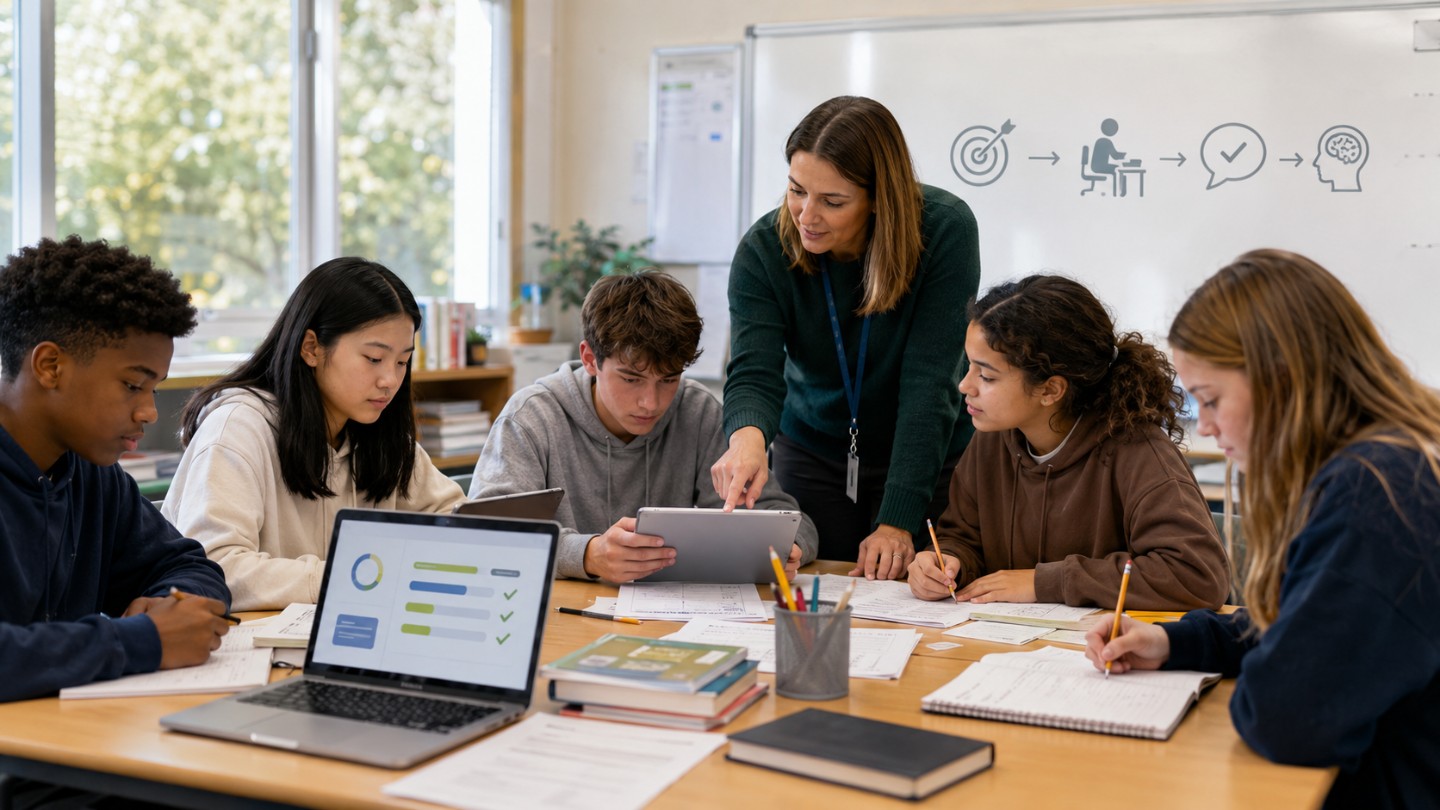
Technology helps students learn better when it improves the learning task. It should help students understand, practice, explain, receive feedback, work with others, or access learning that would otherwise be harder to reach.
The better question is not whether students should use technology. The better question is when a digital tool supports learning more effectively than a simpler method. OECD’s 2025 review on digital technologies and student learning found that access to technology alone does not guarantee educational gain; learning results depend on pedagogy, classroom use, and context. UNESCO’s 2023 Global Education Monitoring Report on technology in education also says technology should be judged by whether it is appropriate, equitable, sustainable, and guided by learners’ needs.
For students, parents, and teachers, the practical test is clear: does the tool help the learner think more clearly, practice more effectively, get useful feedback, or participate more fully? If not, it may be adding screen time without adding learning value.
Answer Summary:
Technology helps students learn better when it is tied to a clear learning goal, requires active thinking, gives useful feedback, supports practice, improves accessibility, and is guided by teachers. It is less useful when students only watch, click, copy, or switch between distractions. Good technology use strengthens teaching and learning; it does not replace them.
Table of Content
- What Does “Learning Better” Mean?
- Quick Answer: When Technology Helps
- Seven Conditions That Make Technology Useful
- When Technology Does Not Help Learning
- Technology vs Traditional Learning
- Examples of Effective Classroom Technology Use
- Checklist Before Using Technology
- Guidance for Students, Parents, Teachers, and Schools
- What About AI Tools?
- Conclusion
Key Takeaways:
-
Technology should serve a learning goal.
-
Active practice matters more than screen time.
-
Feedback is one of the clearest classroom uses of digital tools.
-
Teachers remain central to effective technology use.
-
Distraction, privacy, and access gaps can reduce learning value.
-
Offline learning methods still matter.
-
AI use needs clear rules, verification, and student explanation.
What Does “Learning Better” Mean?
Learning better means students understand more accurately, remember more reliably, apply ideas in new situations, and use feedback to improve their work. It does not mean students spend more time on a device.
A student may look busy on a screen but still learn little. Another student may use a short digital quiz, correct mistakes, and leave with stronger understanding. The difference is not the device alone. The difference is the learning action.
Useful learning actions include:
-
Explaining an idea in one’s own words
-
Practicing a skill at the right level of challenge
-
Receiving feedback and correcting errors
-
Comparing sources, solutions, or examples
-
Creating a draft, model, recording, or presentation
-
Revising work after teacher or peer feedback
-
Using accessibility support to reach the same learning goal
Technology helps when it supports one or more of these actions.
Quick Answer: When Technology Helps
Technology helps when it improves the quality of the learning task. A digital tool should make the task clearer, more accessible, more responsive, or more connected to feedback.
The Education Endowment Foundation’s guidance on using digital technology to improve learning advises schools to consider how digital technology can improve pupils’ learning before adopting it. Its guidance focuses on classroom uses such as explanations, practice, assessment, and feedback.
A useful question for teachers is: “What can students do better with this tool than without it?” If the answer is unclear, the tool may not belong in that lesson.
Seven Conditions That Make Technology Useful
Technology helps most when it supports specific learning conditions. These conditions are more reliable than broad claims about classroom devices.
1. When It Supports a Clear Learning Goal
Technology should be selected after the learning goal is clear. A teacher may want students to compare historical sources, solve equations, revise an essay, understand a science process, or practice pronunciation. The tool should fit that purpose.
For example, a simulation can help students test a science idea. A shared document can help students revise writing. A quiz platform can help teachers see which concept needs reteaching. In each case, the tool serves the lesson.
If the goal is only “use technology,” the lesson is weak.
2. When Students Think Actively
Technology helps when students think, practice, explain, create, or revise. It helps less when students only watch, click, scroll, or copy.
A video becomes more useful when students pause to answer questions, summarize the idea, or apply it to a problem. A digital reading task becomes stronger when students annotate, define terms, compare claims, and cite evidence. A practice app becomes stronger when students review their errors instead of racing through points.
Active thinking gives the task learning value. For related study habits, see effective learning strategies for school students.
3. When It Gives Timely Feedback
Feedback helps students see what to change. Digital tools can make feedback faster in some situations, especially for short quizzes, low-stakes checks, vocabulary practice, math practice, and draft comments.
For example, a teacher can use a quick quiz after a lesson to see whether students misunderstood a key idea. The teacher can then reteach, regroup, or assign practice based on the results.
Feedback should be useful, not only fast. “Incorrect” is weak feedback. “Check your evidence,” “review step two,” or “compare this answer with the model response” gives the learner a clearer next action.
4. When Practice Is at the Right Level
Technology can support practice when it gives extra attempts, adjusts difficulty, or helps students review missed ideas. This is useful for skills such as vocabulary, arithmetic, language learning, grammar, and retrieval practice.
Practice should still connect to instruction. A student who repeats the same mistake in an app needs teacher guidance, not more clicks. Teachers should review patterns in student work and decide what to reteach or extend.
Technology helps practice when it gives students more chances to retrieve, apply, and correct knowledge.
5. When It Makes Hard Ideas Easier to See
Some ideas are hard to observe directly. Technology can help students see processes that are too fast, too slow, too small, too large, or too abstract.
Examples include:
-
A simulation of electric circuits
-
A model of planetary motion
-
A slow-motion video of movement in sports or science
-
An interactive map showing change over time
-
A diagram that connects words, images, and labels
The tool should reduce confusion. A simple visual with teacher explanation is often stronger than a busy animation with no task.
6. When It Improves Accessibility
Technology helps when it gives more students access to the same learning goal. Accessibility tools include captions, transcripts, screen readers, text-to-speech, speech-to-text, adjustable text size, keyboard navigation, and alternative response formats.
Accessibility should not lower expectations. A student using text-to-speech can still analyze a text. A student using speech-to-text can still organize an argument. The support changes the access route, not the learning goal.
7. When It Helps Teachers Respond to Student Needs
Technology can help teachers see patterns in student understanding. Exit tickets, digital quizzes, shared drafts, discussion boards, and polling tools can show what students know, where they are confused, and who needs support.
Teacher judgment remains central. A dashboard or quiz result is only useful when the teacher uses it to make a better instructional decision.
When Technology Does Not Help Learning
Technology does not help when it distracts students, weakens attention, replaces thinking, or widens access gaps. The risk is not only “too much screen time.” The bigger issue is poor use.
When It Distracts From the Task
Digital distraction is a serious learning concern. OECD’s PISA-based report on students, digital devices, and success found that students who reported being distracted by peers using digital devices in some, most, or every mathematics class scored lower in mathematics tests. The report presents this as a relationship between distraction and performance, not proof that devices alone caused the score difference.
This does not mean every device should be banned in every lesson. It means schools need clear routines: when devices are open, when they are closed, which tools are allowed, and what students should produce.
Students who struggle with focus can also review practical habits for digital distraction and focus.
When Students Only Consume Content
Watching a lesson video is not the same as learning the lesson. Reading slides is not the same as understanding the concept. Copying an answer is not the same as solving the problem.
Passive technology use can introduce a topic, but it should lead to a learning action. Students should summarize, question, apply, discuss, practice, or revise.
When Teachers Do Not Receive Support
Technology often fails when teachers are given tools without training, planning time, technical support, or curriculum alignment. A platform can have useful features and still be a poor fit for a classroom.
Teachers need more than login instructions. They need to know when to use the tool, how to interpret student data, how to respond to errors, and what to do when the tool interrupts the lesson.
When Access and Privacy Are Weak
Technology can widen inequality when some students have reliable devices, strong internet, and quiet study space while others do not. It can also raise privacy and safety concerns when student data is collected without clear need or when online spaces are poorly managed.
Schools should review privacy, accessibility, age suitability, data collection, content quality, and offline alternatives before making a tool central to learning.
Technology vs Traditional Learning
Technology and traditional learning should not be treated as fixed opponents. The stronger choice depends on the task.
Screens often help when a lesson needs quick feedback, accessibility tools, simulation, multimedia explanation, shared drafting, or distance collaboration. Offline methods often work better for sustained reading, handwriting practice, face-to-face discussion, drawing by hand, physical exploration, and quiet reflection.
A strong lesson can combine both. Students may read a printed text, use a digital poll to check understanding, discuss ideas in groups, and submit a revised paragraph online. The method should fit the learning goal.
Examples of Effective Classroom Technology Use
The table below shows how technology can support learning when the goal is clear.
| Learning Goal | Useful Technology Use | Student Action | Safeguard |
|---|---|---|---|
| Check understanding | Short quiz after a lesson | Answer, review feedback, correct errors | Discuss common mistakes |
| Understand a science process | Simulation or animation | Predict, test, explain results | Use guiding questions |
| Improve writing | Shared document with comments | Revise claim, evidence, and structure | Use clear criteria |
| Build vocabulary | Spaced practice tool | Retrieve meaning and use words in sentences | Require student examples |
| Support reading access | Captions, transcript, text-to-speech | Read, listen, annotate, summarize | Keep the learning goal clear |
| Compare sources | Digital research organizer | Check author, evidence, date, and purpose | Teach source evaluation |
| Prepare for discussion | Poll or short forum response | Submit an idea and respond to peers | Set discussion norms |
Checklist Before Using Technology
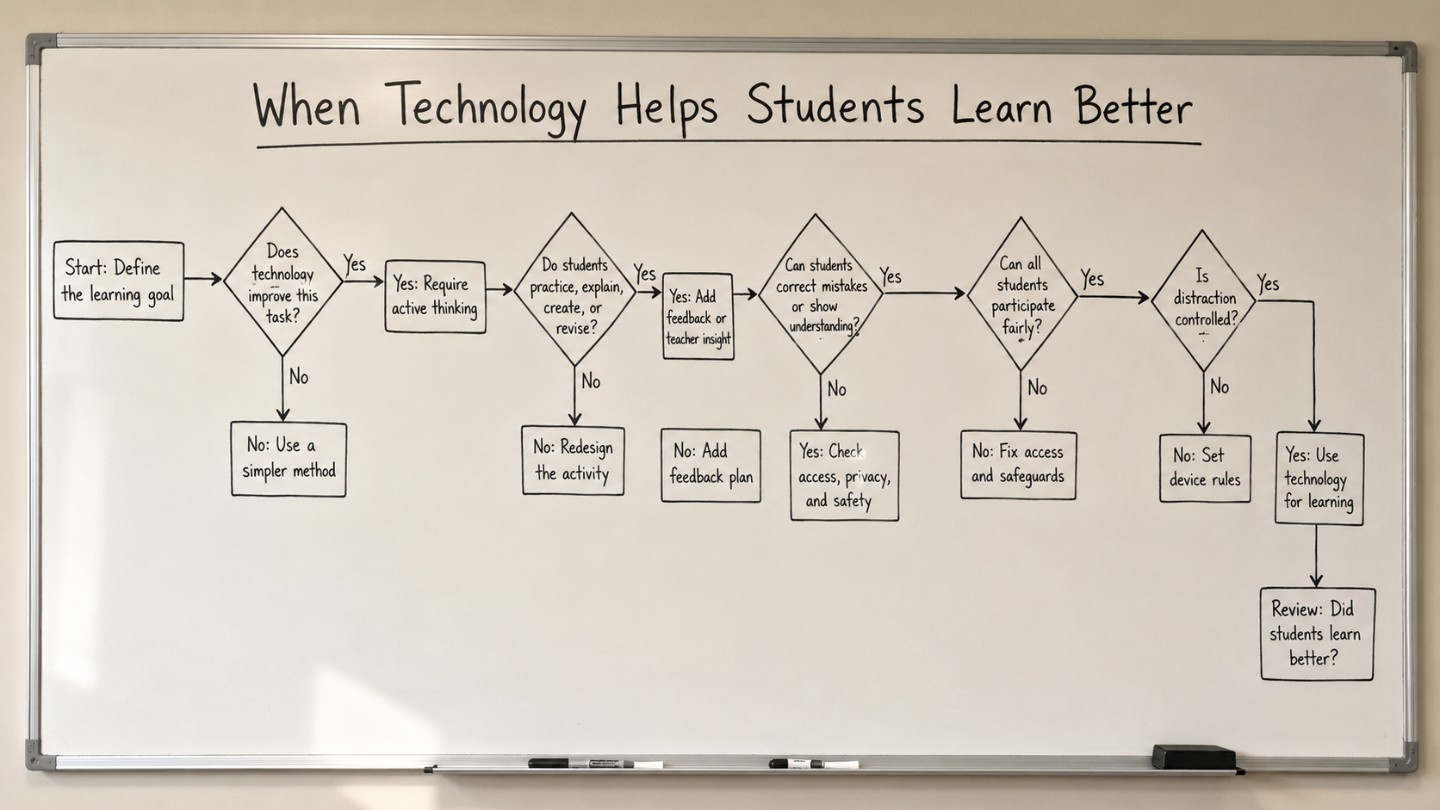
Teachers and schools should use technology only when it passes a learning-purpose check.
Ask these questions before using a digital tool:
-
What is the learning goal?
-
What will students do with the tool?
-
Will students think, practice, create, explain, or revise?
-
Will the tool give feedback or help the teacher give feedback?
-
Is the task better with technology than with a simpler method?
-
Can all students access the tool or an equal alternative?
-
Are privacy, safety, and age suitability clear?
-
What is the plan for distraction?
-
What evidence will show that students learned better?
If several answers are unclear, revise the activity or use another method.
Guidance for Students, Parents, Teachers, and Schools
Different readers need different signals of whether technology is helping.
For Students
Technology is helping if you can explain what you learned without copying from the screen. After using a tool, ask yourself:
-
What did I understand better?
-
What mistake did I correct?
-
What feedback did I use?
-
Can I solve a similar problem without help?
-
Can I explain the idea in my own words?
If the tool only helped you finish faster without understanding, it did not help enough.
For Parents
Parents do not need to judge every app. They can ask learning-focused questions:
-
What was the goal of the activity?
-
What did you produce?
-
What feedback did you receive?
-
What did you revise?
-
What would you do differently next time?
These questions are more useful than asking only how long the child used a screen.
For Teachers
Teachers should connect technology use to assessment, feedback, and lesson design. A useful tool should help answer one of these questions:
-
What do students understand now?
-
Which misconception needs attention?
-
Who needs more practice?
-
Who is ready for extension?
-
What evidence shows that the tool improved the task?
For School Leaders
School leaders should judge technology by learning value, access, cost, teacher workload, privacy, and sustainability. A school should be able to explain why a tool is used, who benefits, what risks exist, and how impact will be reviewed.
What About AI Tools?
AI tools can help learning when they support questioning, feedback, brainstorming, language practice, revision, or accessibility under clear rules. They can harm learning when students use them to replace reading, writing, problem-solving, or original explanation.
UNESCO’s AI Competency Framework for Teachers defines the knowledge, skills, and values teachers need for AI use and misuse in education. It places teacher judgment, ethics, and human agency at the center of AI use in learning.
A safe classroom rule is: students may use AI only in ways the teacher allows, and they should still verify information, cite sources where required, revise the output, and explain the final work in their own words. For a related discussion, see AI in teaching and learning.
Because AI rules differ by school, course, age group, and country, students should check their school’s current academic honesty and AI-use policy before relying on any AI tool for assignments.
Conclusion
Technology helps students learn better when it supports a clear learning goal, active thinking, feedback, accessibility, teacher guidance, and focused practice. It does not help simply because it is digital.
Good technology use strengthens teaching. It helps students see, practice, explain, revise, and participate. Weak technology use adds distraction, passive screen time, or shortcut behavior without improving understanding.
The practical rule is clear: choose the method that fits the learning task. Use technology when it adds learning value. Use offline methods when they fit better.


Comments 0
No comments yet. Be the first to start the conversation.