



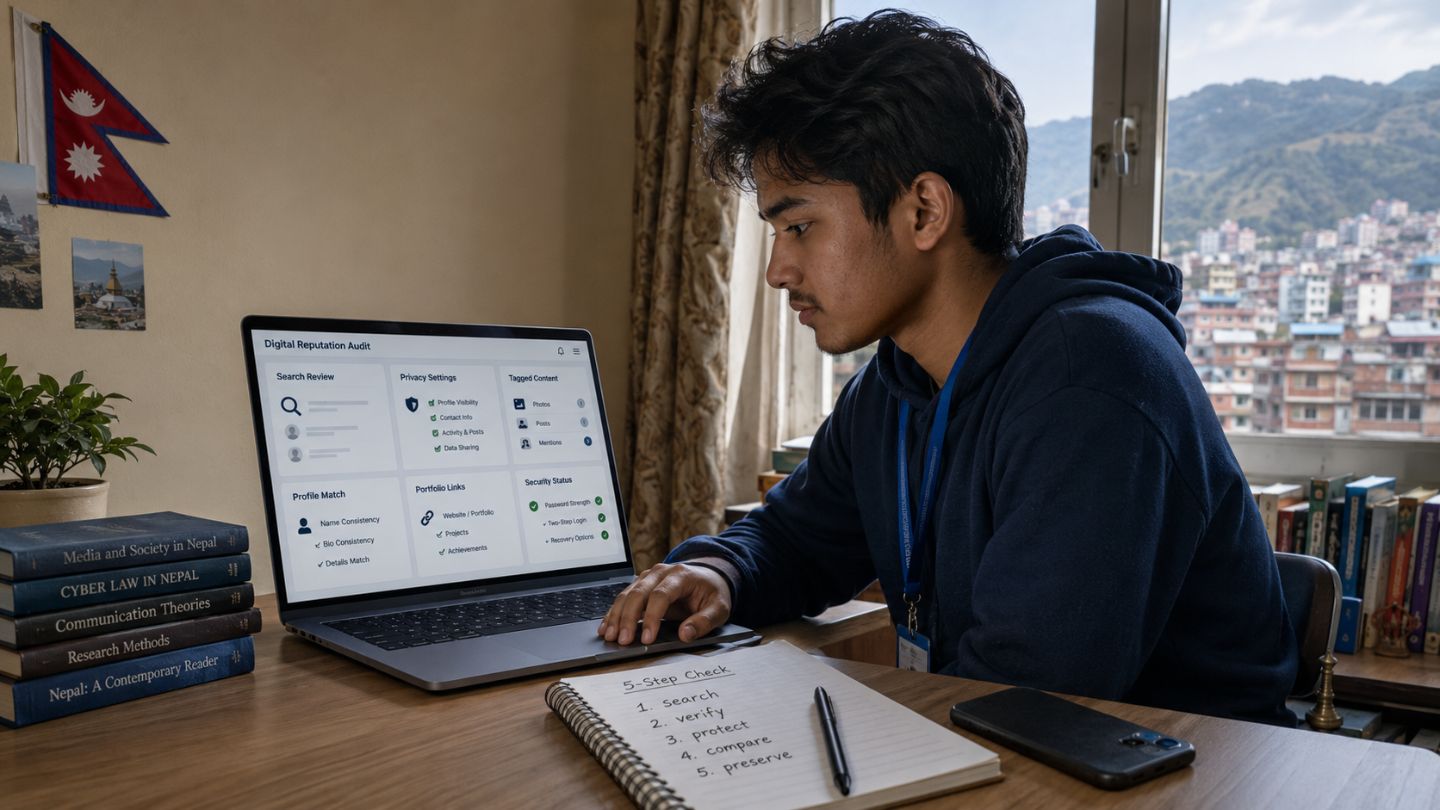
A student’s digital reputation is the impression people may form from online information connected with that student. It can include public profiles, social media activity, comments, tagged photographs, search results, portfolios, project pages, publications, and material posted by others.
The Australian eSafety Commissioner defines digital reputation as the digital footprint created by what a person says and does online, together with what others post about that person. Posts, shares, comments, follows, and tags can all contribute to this reputation.
Digital reputation may influence how an admissions officer, scholarship provider, internship coordinator, recruiter, teacher, or professional contact interprets publicly available information. Screening is not universal, however, and online material is generally only one possible part of a wider decision.
The approved research review dated July 20, 2026, did not identify reliable national evidence or a Nepal-wide policy showing that colleges, scholarship providers, or employers in Nepal routinely inspect every applicant’s social media. Screening should therefore be treated as a possibility, not as a standard practice or hidden score.
Managing a digital reputation is not about creating a false personality. It is about understanding what is public, correcting inaccurate information, protecting private data, keeping application claims consistent, and presenting genuine evidence where it supports an education or career goal.
Answer Summary: Digital reputation for students may affect some education and career decisions, but practices differ among institutions, employers, countries, and opportunities. Students can reduce avoidable risks by reviewing search results, checking privacy settings and tags, securing accounts, correcting false information, and keeping public profiles consistent with applications. A suitable online presence cannot replace grades, eligibility, verified qualifications, interviews, references, or other formal selection requirements.
Table of Content
- What Is Digital Reputation for Students?
- Can Digital Reputation Affect Student Opportunities?
- What Can Someone Realistically Find About You?
- Student Digital Reputation Readiness Check
- How to Audit Your Digital Reputation
- How Should You Decide What Action to Take?
- How to Repair and Protect Your Online Reputation
- How to Build a Credible Professional Online Presence
- Opportunity-Specific Readiness Checklists
- Common Myths and Mistakes
- A 30-Day Digital Reputation Plan
- When Should Students Ask for Help?
- Manage Evidence, Not a False Personality
- Frequently Asked Questions
- Sources Used
Key Takeaways:
-
Digital footprint, digital identity, digital reputation, and professional presence are related but distinct.
-
Public information may influence an opportunity, but screening is not universal.
-
Privacy settings reduce visibility but cannot control screenshots, reposts, or third-party material.
-
Accuracy and consistency matter more than creating a highly polished persona.
-
Students should preserve useful evidence instead of deleting everything.
-
Removing a result from Google Search does not remove it from the original website.
-
Impersonation, threats, scams, and exposed personal data require prompt support.
What Is Digital Reputation for Students?
Digital reputation is how other people interpret online information connected with a student. It develops from intentional activity, data created through internet use, and information published by others.
The University of British Columbia distinguishes digital identity and digital footprint. Digital identity is the representation a person deliberately creates online, while a digital footprint includes information actively shared and data generated through online activity.
Digital Footprint
A digital footprint is the trail of information associated with online activity.
An active digital footprint comes from deliberate actions such as:
-
Publishing posts or photographs.
-
Commenting on public content.
-
Creating a profile.
-
Uploading a project.
-
Participating in a public discussion.
-
Sharing or reacting to content.
A passive digital footprint may include information generated or collected while someone uses websites and applications. Examples include browsing history, search queries, website visits, cookies, and Internet Protocol addresses.
Not every part of a passive footprint is publicly visible. The distinction still helps students understand that their digital data extends beyond material they consciously publish.
Digital Identity
Digital identity is the information a student deliberately uses to represent themselves online. It may include:
-
Name.
-
Profile photograph.
-
Biography.
-
Education details.
-
Skills and interests.
-
Portfolio links.
-
Project descriptions.
-
Published work.
Students generally have more control over their digital identity than over their complete digital footprint. They can edit a biography or project description, but they may not control an old organization page or a photograph uploaded by someone else.
Digital Reputation
Digital reputation is the interpretation people form from available information. A reviewer may see someone as credible, inconsistent, respectful, careless, skilled, or unreliable.
Interpretation depends on context. A public disagreement, for example, is not automatically harmful. Respectful criticism differs from threats, harassment, discrimination, or deliberate misinformation.
Professional Online Presence
A professional online presence is the part of a student’s digital identity organized for education, employment, or professional participation.
It may include:
-
A professional networking profile.
-
An online portfolio.
-
A project repository.
-
A publication profile.
-
A personal professional website.
-
A page documenting research or creative work.
A student controls what is published on these pages, but other people decide whether the evidence appears accurate, relevant, and trustworthy.
| Term | Meaning | Student example |
|---|---|---|
| Digital footprint | Data connected with online activity | Posts, tags, browsing data, account activity |
| Digital identity | Intentional online representation | Profile, biography, portfolio |
| Digital reputation | How others interpret available information | Credible, inconsistent, respectful, unreliable |
| Professional presence | Education- or career-focused evidence | Project page, portfolio, publication list |
Can Digital Reputation Affect Student Opportunities?
Digital reputation may affect some decisions, but it is rarely the only consideration. Academic results, eligibility, application documents, interviews, assessed work, references, and verified qualifications remain central to formal selection processes.
| Opportunity | Information that may be visible | Main qualification |
|---|---|---|
| College or scholarship | Public posts, activities, publications, major incidents | Screening is not universal, and policies vary |
| Internship or employment | Professional profiles, portfolios, projects, public comments | Review methods and laws differ |
| Professional trust | Attribution, conduct, corrections, consistency | Trust develops through repeated behaviour |
College Admission
Some admissions officers review public social media, but available evidence does not show that every institution searches every applicant.
A 2023 Kaplan survey reported that 67% of surveyed admissions officers considered reviewing applicants’ social media acceptable, while 28% said they had done so. The survey involved officers from 205 selected national, regional, and liberal arts colleges and universities in the United States. Participants were contacted between August and December 2023.
This was a commercial survey of selected U.S. institutions. It was not a global study and does not establish standard practice in Nepal.
Public information may attract attention when it:
-
Materially contradicts an application.
-
Contains evidence of serious misconduct.
-
Misrepresents qualifications or activities.
-
Becomes connected with a widely reported event.
-
Provides evidence relevant to the application.
A positive profile does not replace academic or eligibility requirements.
Scholarships
Scholarship providers use different application and verification processes. The research foundation for this article did not identify reliable evidence showing routine social media screening across scholarship providers.
Applicants should instead focus on verifiable consistency. Public claims about volunteering, leadership, awards, advocacy, research, or community work should match application documents and supporting records.
A portfolio may help when a scholarship application permits links. Students should avoid publishing:
-
Identity documents.
-
Financial records.
-
Private information about beneficiaries.
-
Other students’ records.
-
Confidential recommendation letters.
-
Personal contact details that do not need to be public.
Internships
Internship coordinators may review professional profiles, portfolios, publications, or project repositories when those materials are relevant to a role.
A student profile does not need a long employment history. It may accurately document:
-
Relevant coursework.
-
Student projects.
-
Volunteer responsibilities.
-
Publications.
-
Presentations.
-
Competitions.
-
Part-time work.
-
Skills the student can explain or demonstrate.
The profile should remain consistent with the resume and application, but it does not need to copy them word for word.
Employment
Employer practices vary by country, organization, sector, position, and screening method. Some recruiters may review publicly available professional information, while others rely on application documents, interviews, references, assessments, or formal background checks.
Students should not assume that every employer conducts online screening or that the same privacy and employment rules apply in every jurisdiction.
The safest approach is to keep public professional information accurate, avoid misrepresenting qualifications, and review any screening notice provided during recruitment.
Professional Trust
Digital reputation may continue to matter after admission or hiring. Accurate attribution, responsible corrections, respectful communication, and honest professional claims can influence how teachers, classmates, clients, employers, and collaborators understand a person.
Trust does not require frequent posting. A small number of accurate profiles and clearly documented projects may be more useful than a large amount of vague or exaggerated content.
What Can Someone Realistically Find About You?
A name search may reveal information from several sources, not only personal social media accounts.
Results may include:
-
Public profiles and photographs.
-
Old usernames.
-
Public comments and forum posts.
-
Tagged photographs or videos.
-
School clubs, competition pages, and event records.
-
Publications, presentations, podcasts, or videos.
-
Portfolio pages and project repositories.
-
Professional biographies.
-
Search-result descriptions.
-
Public contact information.
-
Information belonging to another person with a similar name.
Search results are not automatically accurate. Common names can create mistaken identity, old pages may lack context, and third-party websites may contain errors.
Online material may also be copied, altered, forwarded, or viewed outside its intended audience. Privacy settings can reduce exposure, but they do not provide complete control over information once others have obtained it.
Student Digital Reputation Readiness Check
The Student Digital Reputation Readiness Check uses five questions to evaluate public information before an application.
1. What Can Someone Find?
Search your name, usernames, photographs, school references, project titles, and public profiles.
Review the results from a browser where you are not signed into the relevant accounts. This may provide a closer view of what an unfamiliar person can see.
2. Is the Information Accurate?
Check:
-
Names.
-
Dates.
-
Education details.
-
Job titles.
-
Awards.
-
Activities.
-
Project descriptions.
-
Skills.
-
Publications.
-
Volunteer roles.
Correct false or outdated information that you control. When another publisher controls the material, request a correction and keep a record of the request.
3. Is It Safe to Make Public?
Look for:
-
Home addresses.
-
Private telephone numbers.
-
Identity documents.
-
Banking information.
-
Live locations.
-
Travel schedules.
-
Recovery codes.
-
Private school records.
-
Confidential information about others.
Information does not need to remain public merely because it is accurate.
4. Does It Match the Application?
Compare public profiles with:
-
Application forms.
-
Resume or curriculum vitae.
-
Portfolio.
-
Interview statements.
-
Certificates.
-
Project records.
-
Employment documents.
Minor wording differences are normal. Material contradictions involving dates, qualifications, awards, or responsibilities should be corrected.
5. Does It Show Genuine Work or Responsibility?
Useful public information may demonstrate:
-
Projects.
-
Publications.
-
Skills.
-
Creative work.
-
Volunteering.
-
Research.
-
Responsible participation.
-
Evidence of learning.
A profile does not need to contain every activity. Its purpose is to make relevant and genuine evidence easier to understand.
How to Audit Your Digital Reputation
A digital reputation audit is a structured review of what is publicly visible, whether it is accurate, and what action it requires.
Search Relevant Name Variations
Try searches using:
-
Your full name in quotation marks.
-
Full name and city.
-
Full name and school or college.
-
Full name and course or profession.
-
Current and previous usernames.
-
Name formats used on certificates or publications.
-
Project or competition titles connected with your name.
Review both standard and image results. Do not assume the first page shows everything.
Create an Inventory
Classify each result as:
-
Accurate and useful.
-
Accurate but unnecessarily public.
-
Outdated or incomplete.
-
False or connected with another person.
-
Harmful, abusive, impersonating, or unsafe.
Record the page, publisher, date found, concern, and planned action.
Screenshots may be useful when reporting impersonation, threats, harassment, or false information. Store them securely rather than reposting the material publicly.
Review Profiles, Tags, and Old Accounts
Check:
-
Public profile fields.
-
Old posts.
-
Public comments.
-
Tagged photographs and videos.
-
Group memberships.
-
Location details.
-
Contact information.
-
Connected applications.
-
Active login sessions.
-
Abandoned accounts.
Review privacy settings and remove unwanted tags where possible. When someone else controls the material, ask them to edit or remove it.
For a repeatable audit and cleanup process, see Collegenp’s guide to managing your digital footprint and online reputation.
Compare Profiles With Formal Records
Check whether education details, dates, roles, awards, skills, and project information agree with formal applications.
Do not inflate a role or alter dates to appear more experienced. An accurate student-level description is easier to explain and verify.
How Should You Decide What Action to Take?
Not every search result should be deleted. The appropriate action depends on whether the information is accurate, useful, private, outdated, misleading, or unsafe.
| Situation | Appropriate first action | Important limitation |
|---|---|---|
| Accurate and useful | Keep or update it | Confirm that it remains relevant and safe |
| Accurate but private | Restrict visibility | Copies may still exist elsewhere |
| Outdated or incomplete | Update or add context | Do not rewrite valid history to mislead |
| False third-party information | Request correction or removal | Keep evidence of the original page |
| Unwanted tagged material | Untag and contact the publisher | Untagging may not delete the original |
| Sensitive personal information | Remove it at the source and request search removal | Search removal does not delete the source page |
| Impersonation, threats, or abuse | Preserve evidence and report it | Avoid arguments that spread the material |
Keep It
Keep information public when it is accurate, safe, relevant, and useful. Examples may include a published article, project page, competition result, or portfolio sample.
Restrict It
Use a limited audience when material is suitable for friends or family but does not need to be publicly searchable.
Update It
Updating may be better than deleting when information is outdated, incomplete, or missing important context.
Remove It
Removal may be appropriate when material:
-
Exposes private data.
-
Contains copied work.
-
Misrepresents current qualifications.
-
Creates an avoidable security risk.
-
No longer serves a legitimate purpose.
Report It
Use platform or authority reporting systems for:
-
Impersonation.
-
Hacked accounts.
-
Harassment.
-
Threats.
-
Blackmail.
-
Scams.
-
Serious privacy violations.
How to Repair and Protect Your Online Reputation
Repair should begin with the original source of the problem. Search engines, platforms, website owners, schools, and authorities have different roles.
Correct Material You Control
For accounts and pages you own:
-
Correct inaccurate details.
-
Remove unnecessary contact information.
-
Restrict content that exposes private data.
-
Add a correction when an earlier statement was materially wrong.
-
Credit collaborators and original sources.
-
Replace copied work with properly attributed work.
-
Close abandoned accounts when appropriate.
Deleting material does not guarantee that every copy disappears. Other users may already have copied, reshared, quoted, or stored it.
Address Tags and Third-Party Material
Remove tags where the platform permits it. Contact the publisher when information is false, outdated, or unnecessarily private.
A removal request should identify:
-
The exact page or post.
-
The inaccurate or sensitive information.
-
Why it should be corrected or removed.
-
The action being requested.
Avoid public arguments that draw additional attention to the material.
Improve Account Security
Use:
-
Strong, unique passwords.
-
A password manager where appropriate.
-
Multi-factor authentication.
-
Current software and security updates.
-
Caution with unexpected links and login requests.
-
Regular checks of account sessions and recovery methods.
Students who access accounts from shared or public networks can review Collegenp’s guidance on public Wi-Fi safety for students.
Request Google Search Removal When Eligible
Google’s personal-information removal tools can help eligible users identify and request removal of search results containing certain contact information. Google may retain results when information is considered valuable to the public, including some content on government, educational, news, or business websites.
Removing a result from Google Search does not remove the information from the original website. When removal at the source is needed, the website owner must usually be contacted separately.
Check Recruiters, Scholarships, and Other Offers
A professional-looking profile, institutional logo, or direct message does not prove that an opportunity is genuine.
Before sending personal information:
-
Check whether the opportunity appears on the organization’s official website.
-
Contact the organization through independently verified details.
-
Confirm any claimed school, teacher, or faculty referral directly.
-
Treat unexpected payment requests as a warning sign.
-
Do not share passwords or one-time security codes.
-
Stop when an unverified contact requests banking or identity information.
Collegenp’s guide to checking digital claims and scams provides a structured source-checking process.
How to Build a Credible Professional Online Presence
A credible professional presence is accurate, relevant, and supported by evidence. Students do not need to convert every personal account into a career profile.
Choose a Suitable Platform
Select a platform based on the type of work being presented.
Examples include:
-
A professional networking profile for education and experience.
-
A portfolio site for design or creative work.
-
A project repository for programming.
-
A publication page for writing or research.
-
A professional profile maintained by an academic or industry platform.
Check the platform’s current minimum-age, privacy, and account rules before joining.
Publish Evidence Instead of Unsupported Claims
Useful evidence may include:
-
A project explanation covering its purpose, method, and result.
-
A research summary.
-
A presentation or poster.
-
A design sample that identifies the student’s role.
-
A documented code project.
-
A publication.
-
Volunteer work with accurate dates and responsibilities.
-
A reflection explaining what was learned.
Group projects require attribution. State your contribution and credit collaborators.
Do not publish confidential information belonging to a school, employer, client, research participant, or beneficiary.
Build a Focused Portfolio
A portfolio should help readers understand:
-
What the student produced.
-
Why the work was undertaken.
-
What the student contributed.
-
Which tools or methods were used.
-
What the outcome demonstrates.
-
What the student learned.
A small number of relevant samples with context may be more useful than a long collection without explanation.
Collegenp’s guide to building a student portfolio explains how to select and present evidence around a clear purpose.
Students can also use a portfolio-first approach to job-ready skills to connect learning activities with visible evidence while recognizing that a portfolio cannot replace every qualification.
Participate Responsibly
Public comments also contribute to reputation.
Before publishing, ask:
-
Is the statement accurate?
-
Is it respectful?
-
Is it necessary?
-
Does it expose private information?
-
Have sources and collaborators been credited?
-
Would additional context prevent misunderstanding?
Disagreement is not automatically harmful. Harassment, threats, plagiarism, impersonation, discrimination, and deliberate misinformation create more serious concerns.
Opportunity-Specific Readiness Checklists
Different applications require different checks. Students should review the opportunity’s published requirements rather than applying one approach to every account.
Before a College Application
-
Search your name and review public results.
-
Confirm that activities and awards match the application.
-
Review tagged photographs and public comments.
-
Remove exposed private records.
-
Keep relevant academic or creative work available when links are permitted.
-
Read the institution’s application and privacy policies.
-
Do not assume a positive profile compensates for missing requirements.
Before a Scholarship Application
-
Confirm dates, roles, awards, and service claims.
-
Protect private financial and identity information.
-
Check whether portfolio links are accepted.
-
Verify the provider through official channels.
-
Keep copies of submitted documents and correspondence.
-
Do not exaggerate the scale or result of community work.
Before an Internship
-
Update the resume, professional profile, and portfolio.
-
Check that listed skills can be demonstrated.
-
Add context to coursework and projects.
-
Test links.
-
Remove outdated contact details.
-
Verify the recruiter before sharing documents.
-
Do not send sensitive records before confirming the organization.
Before Employment
-
Align work history, dates, titles, and qualifications.
-
Review public professional comments.
-
Check old accounts using the same name.
-
Update project links.
-
Ask references before listing them.
-
Prepare an accurate explanation for genuine inconsistencies.
-
Review screening disclosures and local rules where applicable.
Common Myths and Mistakes
“Every college searches every applicant”
Available evidence does not support this claim. Some admissions officers review public information, but screening is not universal.
“A private account removes my digital footprint”
Privacy settings reduce visibility but do not remove previous copies, reposts, tags, account records, or information published elsewhere.
“Deleting a post removes every copy”
Deleting the original removes the version you control. Other users may already have copied, reshared, quoted, or stored it.
“Students need to look corporate online”
Students should present accurate information appropriate to their education and experience. Corporate language and constant posting are not requirements for credibility.
“Every student needs a professional social media profile”
Professional platforms can support some education and career goals, but they are not required for every application.
“A large following proves credibility”
Follower count does not verify skill, authorship, conduct, qualifications, or accuracy.
“A clean search page guarantees selection”
No online profile guarantees admission, a scholarship, an internship, or employment. Formal selection criteria still apply.
“A paid reputation score predicts success”
No universal online reputation score can reliably predict selection across institutions and employers. Students should avoid services that promise guaranteed cleanup, ranking, admission, or employment.
A 30-Day Digital Reputation Plan
A four-week plan can make the process manageable without encouraging rushed deletion.
Week 1: Discover
-
Search your name and usernames.
-
Review image results.
-
Identify public profiles.
-
Check school, club, and competition pages.
-
Create an inventory.
-
Separate useful material from errors and privacy concerns.
Week 2: Correct and Secure
-
Update inaccurate profiles.
-
Review tags.
-
Restrict unnecessary public information.
-
Change weak or reused passwords.
-
Enable multi-factor authentication.
-
Review active sessions.
-
Close abandoned accounts where appropriate.
Week 3: Build Evidence
-
Choose one professional profile or portfolio.
-
Add accurate education details.
-
Select relevant projects.
-
Explain your role.
-
Check attribution.
-
Protect confidential information.
-
Verify that links work.
Week 4: Check Consistency
-
Compare profiles with applications.
-
Review dates and qualifications.
-
Test the page from a signed-out browser.
-
Confirm contact details.
-
Record pending correction or removal requests.
-
Schedule the next review.
An annual review is a practical baseline. Students should also review public information before major applications, after an account-security incident, or following important platform changes.
When Should Students Ask for Help?
Students should seek support when a problem involves safety, serious false information, exposed personal data, or content they cannot control.
Ask a parent, guardian, trusted adult, school official, platform safety team, website owner, institution, or relevant authority when the issue involves:
-
A fake or hacked account.
-
Harassment or repeated targeting.
-
Threats or blackmail.
-
Exposed addresses or identity documents.
-
Serious false allegations.
-
Private material posted without consent.
-
An account that cannot be recovered.
-
A suspicious recruiter requesting money or credentials.
-
A situation in which preserving evidence may be important.
The Nepal Police Cyber Bureau reporting guidance lists complaint routes for fake or hacked identities, online financial fraud, and other cyber incidents. It asks complainants to provide relevant links, clear screenshots, and identity documentation. Complaints may be submitted through police offices, directly to the Cyber Bureau, or by email when personal attendance is not possible.
Students should involve a trusted adult before submitting sensitive identity documents or handling a serious complaint.
Manage Evidence, Not a False Personality
Digital reputation management is not about hiding every past action or creating a perfect online identity. It is the practical work of understanding what is public, correcting what is inaccurate, protecting what is private, and presenting genuine evidence where it supports a real goal.
The research reviewed for this article did not establish routine applicant social media screening across Nepal’s colleges, scholarship providers, or employers. Public information should therefore be treated as one possible influence, while formal requirements and verified application evidence remain central.
A useful final check is straightforward:
-
Determine what someone can find.
-
Confirm whether it is accurate.
-
Decide whether it is safe to keep public.
-
Compare it with the application.
-
Preserve evidence of genuine work and responsibility.
Frequently Asked Questions
Do colleges check students’ social media?
Some admissions officers do, but the practice is not universal. A 2023 Kaplan survey found that 28% of admissions officers in its selected U.S. sample said they had reviewed applicants’ social media. The result should not be generalized to Nepal or every institution.
Do scholarship providers check social media?
Policies differ. The research reviewed for this article did not identify evidence of routine screening across scholarship providers. Applicants should keep public claims accurate and follow each provider’s published requirements.
Can employers see private social media accounts?
Employers can see publicly available information and material shared with them. Privacy settings may restrict ordinary access, but copied or reposted content may remain visible elsewhere. Students should not provide passwords or account access in response to an unverified request.
Can deleted posts still appear elsewhere?
Yes. Screenshots, reposts, quotations, archives, or stored copies may remain after the original material is deleted.
Is having no social media account a problem?
Most applications do not require a broad social media presence. A student may choose not to maintain public personal accounts and still use a portfolio or professional page when it serves a specific purpose.
Should secondary-school students create professional profiles?
Only students who meet a platform’s current minimum-age rules should create accounts. Privacy, safety, and whether the profile serves a clear purpose should also guide the decision.
What should a student portfolio include?
A portfolio should contain relevant samples with dates, context, the student’s contribution, methods used, and learning gained. It should not expose confidential information or other people’s private data.
How often should students audit their digital reputation?
An annual review is a practical baseline. Additional reviews are useful before major applications, after a security incident, or when important public information changes.
What should I do if someone posts harmful information about me?
Preserve relevant evidence, use platform reporting tools, and request correction or removal when safe. Involve a trusted adult or relevant authority when the issue includes threats, blackmail, impersonation, exposed personal data, or serious harm.
Can Google remove information about me?
Google may remove eligible search results containing certain personal information. Removal from Google Search does not delete the information from the original website.
Sources Used
-
Australian eSafety Commissioner, “Digital Reputation.”
-
University of British Columbia Privacy Matters, “Securing Your Online Reputation: Protecting Your Digital Footprint.”
-
Kaplan, “College Admissions Officers Think It’s OK to Visit Applicants’ Social Media, But Most Don’t,” 2024.
-
Google Search Help, “Find and Remove Personal Info in Google Search Results.”
-
Nepal Police Cyber Bureau, “Report Cyber Crime.”





Comments 0
No comments yet. Be the first to start the conversation.