



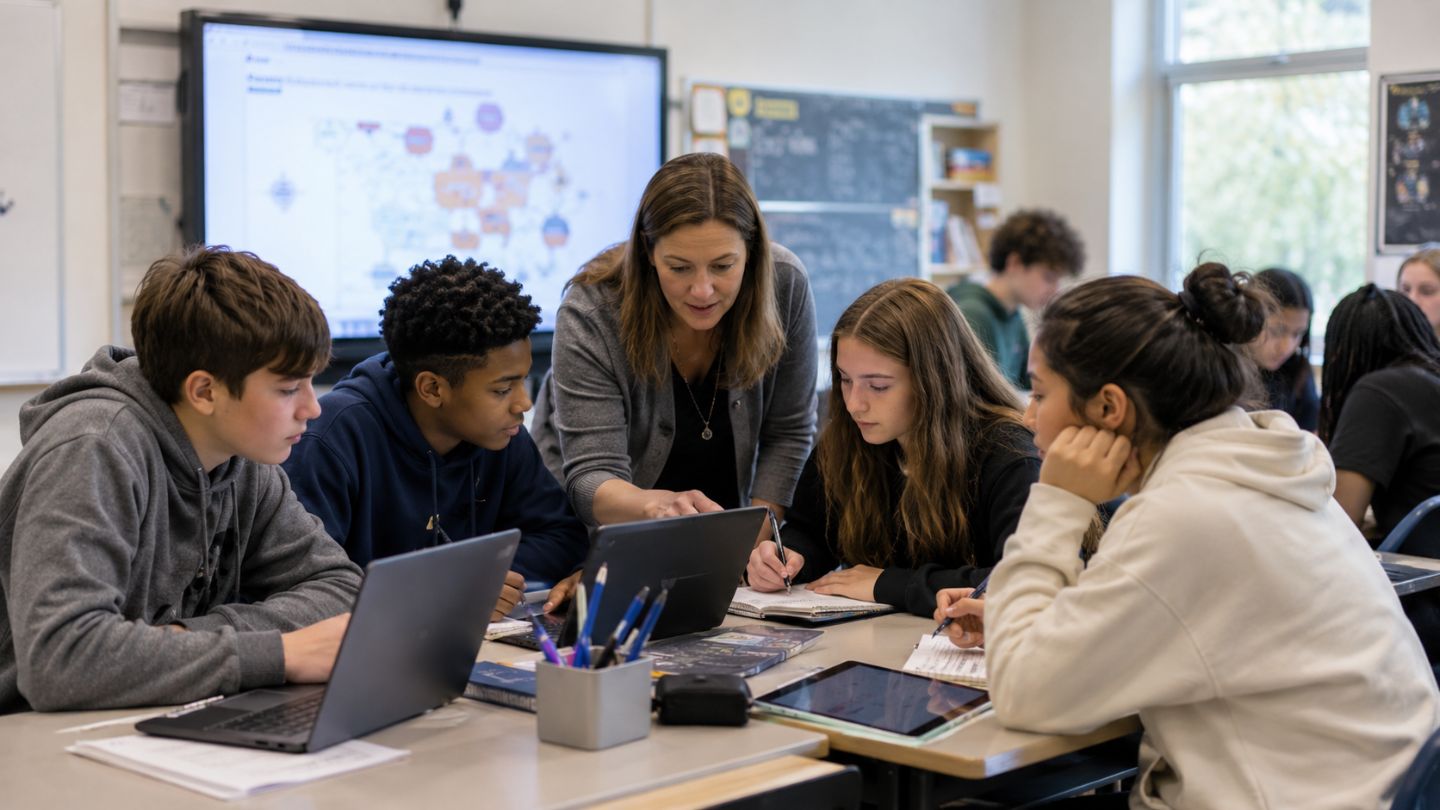
Technology can improve student learning outcomes when it supports clear teaching goals, guided practice, timely feedback, active learning, and fair access. It can weaken learning when it distracts students, widens access gaps, or lets students complete work without understanding.
The main question is not whether schools should use technology. The practical question is how digital tools should be used so students learn more, remember better, participate meaningfully, and build skills they can apply. A digital quiz, online lesson, simulation, learning management system, or artificial intelligence (AI) tool can help when it solves a real learning problem. The same tool can hurt learning when it replaces thinking, weakens attention, or is introduced without teacher support.
OECD’s 2025 review of digital technologies and student learning found that access to technology alone does not guarantee educational gain. It also states that successful digital education depends on pedagogical solutions, not only technical ones. UNESCO’s 2023 Global Education Monitoring Report also advises that technology in education should be judged by learner needs, equity, sustainability, and evidence.
Answer Summary:
Technology improves student learning outcomes when it is used with clear learning goals, teacher guidance, meaningful practice, feedback, accessibility, and outcome evaluation. It does not improve learning by itself. Poorly planned technology use can increase distraction, inequality, shallow work, privacy concerns, and overdependence. The strongest approach is to choose tools after defining the learning outcome.
Table of Content
- What Are Student Learning Outcomes?
- How Can Technology Improve Student Learning Outcomes?
- What Does the Evidence Say?
- When Can Technology Hurt Student Learning?
- Why Do Teachers Remain Central?
- Technology vs Traditional Learning: Which Works Better?
- How Does AI Affect Student Learning Outcomes?
- Practical Examples of Technology Improving Learning
- Technology in Certificates, Degrees, and Skill Pathways
- How to Evaluate Whether Technology Is Helping
- Conclusion
Key Takeaways
-
Technology helps most when it supports teaching, not when it replaces teaching.
-
Learning outcomes include achievement, engagement, retention, skills, participation, and equity.
-
Device access matters, but access alone is not enough.
-
Feedback, practice, and teacher guidance are major pathways to learning.
-
AI tools need clear rules, source checking, and assessment safeguards.
-
Digital distraction and unequal access can reduce learning.
-
Schools should measure learning impact before expanding any tool.
What Are Student Learning Outcomes?
Student learning outcomes are the measurable changes in what students know, understand, can do, and apply after learning. They include academic performance, engagement, retention, skill development, participation, and fair access to learning.
For a broader explanation of how outcomes differ from learning objectives, see Collegenp’s guide on learning objectives vs learning outcomes.
Academic performance
Academic performance includes grades, test scores, projects, practical tasks, written work, oral performance, and teacher assessments. Technology affects academic performance by changing how students receive instruction, practice skills, submit work, revise errors, and receive feedback.
For example, a math platform can help a student practice weak areas. A writing tool can help a student notice grammar or structure problems. These tools support performance only when the student still learns the concept behind the answer.
Engagement and participation
Engagement means students pay attention, ask questions, complete tasks, join discussions, and stay involved in learning. Digital polls, quizzes, simulations, shared documents, and discussion boards can increase participation when they ask students to think and respond.
Engagement should not be measured only by time on a device. A student may spend time on a screen without learning. A useful measure is whether the activity supports the lesson goal and leads to better understanding.
For related classroom strategies, see Collegenp’s article on student engagement.
Retention and understanding
Retention means students can remember and use knowledge after time has passed. Understanding means they can explain ideas, solve new problems, and apply learning in new contexts.
Technology can support retention through retrieval quizzes, spaced practice, revision tasks, and feedback. It can reduce retention when students copy, click through tasks, or depend on tools to produce answers without processing the content.
Digital and critical thinking skills
Digital skills include finding information, using platforms responsibly, protecting privacy, communicating online, and selecting appropriate tools. Critical thinking includes checking sources, comparing evidence, identifying weak claims, and explaining reasoning.
OECD’s PISA 2022 Volume V examines students’ readiness for learning in the digital age, including how they use digital resources and manage information on digital platforms. This matters because technology should be treated as both a learning tool and a subject of responsible learning.
Equity and access
Equity means students have a fair chance to learn regardless of income, location, disability, language, device access, or internet quality. Technology can expand access through recorded lessons, assistive tools, online resources, and remote support. It can also widen gaps when students lack devices, stable internet, electricity, quiet study space, or adult guidance.
The digital divide is not only about owning a device. It also includes connectivity, teacher readiness, accessible content, language support, and learning support at home. For related context, see Collegenp’s article on the digital divide.
How Can Technology Improve Student Learning Outcomes?
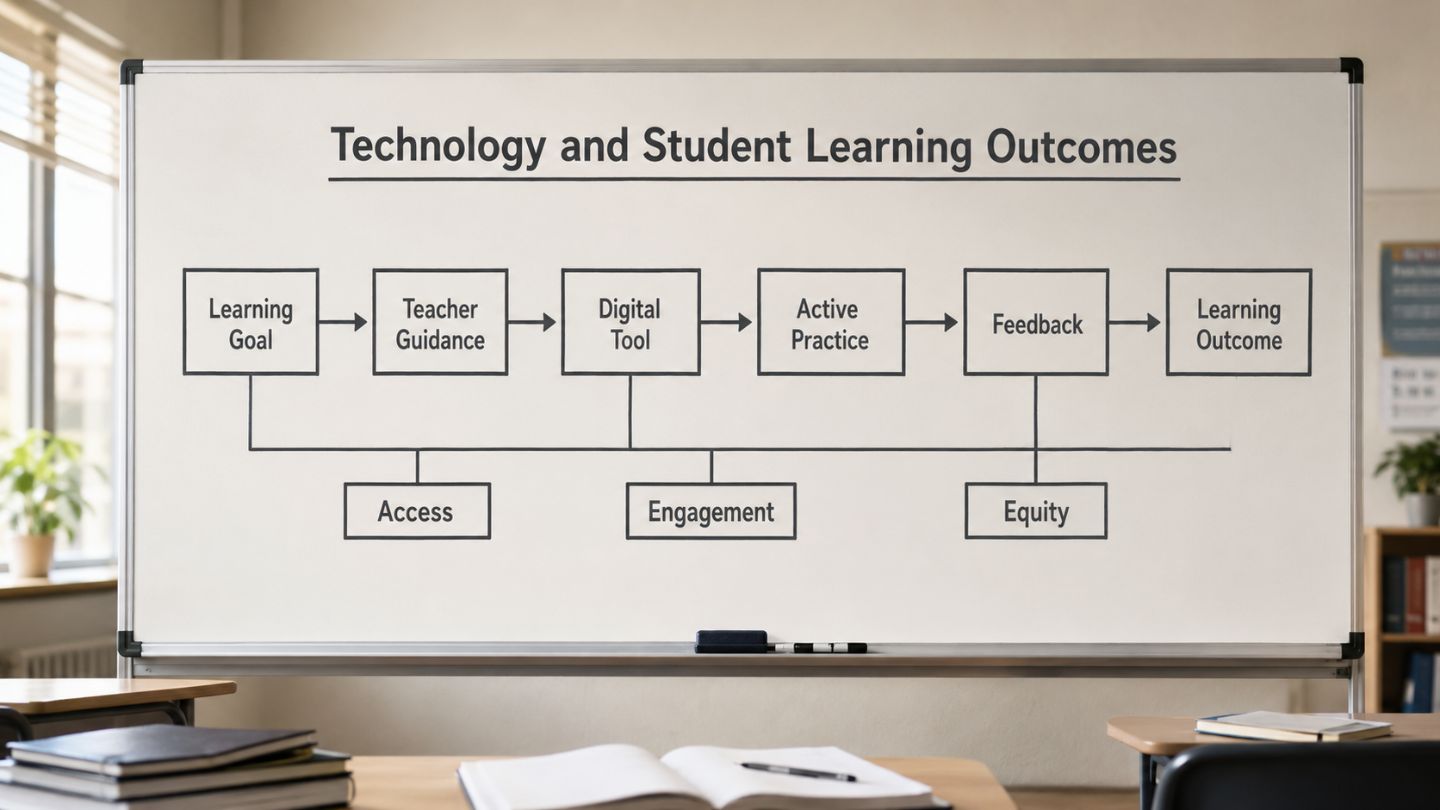
Technology improves learning when it gives students better access, more practice, faster feedback, stronger interaction, and support matched to their needs. It works best when selected for a specific learning purpose.
Better access to learning resources
Digital tools can give students access to e-books, recorded lessons, open educational resources, teacher notes, practice materials, and online libraries. This is useful for students who miss class, live far from schools, need review materials, or study in low-resource settings.
The World Bank describes digital technologies in education as tools that can support teaching, learners, and education systems when used effectively. Access is helpful, but access without guidance can leave students with more material and less clarity.
More practice with feedback
Practice improves learning when students receive feedback and revise their work. Digital quizzes, learning dashboards, and formative assessment tools can help teachers see which concepts students understand and which need reteaching.
The Education Endowment Foundation says its digital technology guidance helps schools consider how technology can improve pupils’ learning. Its evidence review also supports careful use of digital tools to inform teaching decisions.
Personalized learning support
Some platforms adjust tasks based on student responses. A student who struggles with fractions may receive simpler examples and extra practice before moving ahead. A student who has mastered a topic may receive a more challenging task.
This can help mixed-ability classrooms. The limit is that personalization can become narrow if it focuses only on what the platform can measure. Students still need discussion, explanation, writing, practical tasks, and teacher judgment.
More active learning
Technology can support active learning when students create, test, compare, explain, revise, or solve problems. Simulations, virtual labs, mapping tools, collaborative documents, and discussion boards can help students engage with content in ways that are hard to achieve through lecture alone.
A 2024 systematic review and second-order meta-analysis on technology-supported learning in higher education examined how digital technology relates to learning activities, not only tool use. This supports a practical point: technology is most useful when it improves the learning task, not when it only changes the medium.
Collaboration and communication
Digital tools can support group writing, peer review, classroom discussion, project planning, and teacher feedback. For example, students can draft together in a shared document, comment on each other’s work, and revise based on feedback.
Collaboration improves outcomes when roles are clear. A shared platform is useful when students plan, contribute, review, and reflect. It is less useful when one student completes the work while others remain passive.
Support for different learning needs
Assistive technology can support students with disabilities or learning barriers. Examples include captions, screen readers, speech-to-text, text-to-speech, adjustable font size, visual organizers, and recorded lessons.
These tools can improve participation, independence, and access. They should be selected based on student need, not as a general replacement for teacher support.
What Does the Evidence Say?
The evidence is positive but conditional. Technology can improve academic performance, but its value depends on pedagogy, tool design, teacher support, student use, and the outcome being measured.
A 2017 meta-analysis in Computers & Education reviewed 122 peer-reviewed studies on elementary students and found a medium effect of technology on learning effectiveness when technology was integrated into pedagogy. A World Development study on 1,823 rural government schools in India found positive learning effects from technology-aided teaching in the subjects covered by the intervention.
These findings should not be read as proof that any device, app, or platform improves learning. OECD’s 2025 review gives a careful system-level warning: access to technology alone does not guarantee educational gain.
The evidence points to three practical conclusions:
-
Technology helps when it improves the learning task.
-
Teacher guidance shapes whether students use tools productively.
-
Results should be measured through learning, not platform activity alone.
When Can Technology Hurt Student Learning?
Technology can hurt learning when it distracts students, widens inequality, weakens attention, or allows task completion without understanding. These risks are manageable, but they need active planning.
Digital distraction
Students may switch from a learning task to messaging, browsing, games, videos, or social media. This weakens attention and can reduce deeper understanding.
A 2025 meta-analysis in Frontiers in Psychology found a small but statistically significant negative association between smartphone use, social media use, video game playing, and students’ academic performance. This does not mean all technology use is harmful. It means poorly managed or leisure-focused use can compete with learning.
Unequal access and the digital divide
Online homework, digital platforms, and remote lessons can disadvantage students who lack devices, stable internet, electricity, quiet space, or adult support. Schools should check access before making digital work mandatory.
For global readers, including students in Nepal and other connectivity-varied contexts, this is a practical issue. A tool that works in one setting may not work well where connectivity, device access, or teacher training is limited.
Overdependence on tools
Overdependence happens when students rely on a tool to do the thinking for them. Examples include copying AI-generated answers, using calculators before understanding number concepts, or relying on translation tools without learning language structure.
The problem is not tool use. The problem is losing the chance to practice reasoning, memory, writing, and problem-solving.
Weak teacher training
Weak teacher training can turn useful tools into extra work or distraction. Teachers need time to understand how a tool fits the curriculum, assessment, classroom management, and student support.
A tool should not be adopted only because it is available. It should be adopted because it helps teachers explain, monitor, assess, or support learning more effectively.
Privacy, safety, and screen fatigue
Digital tools can collect student data, create account-management issues, and raise privacy concerns. UNESCO’s GenAI guidance calls for policy planning, human capacity development, and a human-centered vision for these tools. The page states that the guidance was published on September 7, 2023, and last updated on January 16, 2026.
Screen fatigue is also a practical concern. Students may need a balance of screen-based work, handwriting, reading, discussion, physical activity, and offline practice. For related safety context, see Collegenp’s article on safe digital tools.
Why Do Teachers Remain Central?
Teachers remain central because technology does not set learning goals, diagnose misconceptions, build classroom trust, or know when a student needs explanation, encouragement, or a different task. Strong teaching determines whether technology supports learning.
Clear learning goals
Teachers should begin with the outcome: What should students learn? The answer may be algebra fluency, reading comprehension, science reasoning, writing revision, language practice, or digital source evaluation.
Only after defining the outcome should teachers select a tool.
Guided use
Students need instructions before digital work, monitoring during the task, and reflection after the task. A strong digital task includes a purpose, success criteria, feedback, and a chance to revise.
For wider context on technology in education, the key issue is not the number of tools but how well those tools support teaching and learning.
Active learning
Active learning asks students to retrieve, explain, apply, compare, create, test, or revise. Technology supports active learning when it gives students a meaningful task.
Useful examples include:
-
answering retrieval questions after a lesson
-
annotating a text with evidence
-
testing variables in a simulation
-
recording oral language practice
-
comparing sources for reliability
-
revising an essay after feedback
Feedback loops
A feedback loop has four parts: task, response, feedback, and revision. Technology can speed up response and feedback. Teachers make the revision meaningful.
Without revision, feedback often becomes another score. With revision, feedback becomes part of learning.
Outcome evaluation
Schools should ask:
-
Did students understand the target concept better?
-
Did weaker students receive useful support?
-
Did students retain learning after time passed?
-
Did the tool improve feedback or only add screen time?
-
Did it reduce or increase teacher workload?
-
Did students become more independent learners?
A tool should be reviewed if it raises activity but does not improve understanding.
Technology vs Traditional Learning: Which Works Better?
Neither technology-supported learning nor traditional classroom learning is better in every situation. A strong learning design often combines teacher explanation, discussion, practice, feedback, and selective digital support.
| Approach | Strengths | Limits | Best Use |
|---|---|---|---|
| Traditional classroom learning | Direct interaction, discussion, social learning, teacher observation | Feedback may be slower; resource access may be limited | Explanation, mentoring, discussion, practical work |
| Technology-supported classroom learning | Practice, feedback, simulations, collaboration, flexible resources | Distraction and access gaps need management | Review, formative assessment, guided practice |
| Online learning | Flexible access and recorded content | Motivation and interaction can be harder | Distance learning, revision, adult learning |
| Blended learning | Combines teacher guidance and digital support | Needs planning and training | Regular classroom use with clear goals |
Blended learning often offers a practical path. A teacher can explain a concept in class, assign digital practice, review results, and reteach weak areas.
For a related discussion, see Collegenp’s guide on online learning.
How Does AI Affect Student Learning Outcomes?
AI tools can support learning when they help students ask questions, practice skills, receive feedback, and review explanations. They can harm learning when students use them to avoid reading, writing, problem-solving, or source checking.
OECD’s 2026 Digital Education Outlook says AI systems that generate content can support learning when guided by clear teaching principles. It also warns that without pedagogical support, students may improve task performance without real learning gains. UNESCO’s AI in education page also states that AI can support teaching, learning, and assessment, while rapid technological change brings risks and policy challenges.
For classroom use, AI rules should answer four questions:
-
What uses are allowed?
-
What uses count as academic misconduct?
-
How should students verify AI outputs?
-
How will teachers assess student thinking?
Good assessment may include oral explanations, drafts, process notes, in-class writing, practical tasks, and reflection. This helps teachers see what students understand, not only what a tool can produce.
For related context, see Collegenp’s article on AI in education.
Practical Examples of Technology Improving Learning
Technology works best when each tool has a clear learning role. The table below connects common tools with the outcomes they can support and the limits teachers should watch.
| Tool | Learning Outcome It Can Support | Limit to Watch |
|---|---|---|
| Learning management system | Organization, assignment tracking, feedback access | It does not teach by itself |
| Digital quizzes | Retrieval practice, quick feedback, exam review | May over-focus on short answers |
| Simulations and virtual labs | Science reasoning, variable testing, concept visualization | Should not replace hands-on work where practical work is needed |
| Collaborative documents | Group writing, peer review, project work | Roles must be clear |
| Recorded lessons | Review, catch-up learning, flexible access | Passive watching may not build understanding |
| Assistive technology | Access, participation, independence | Needs student-specific selection |
| Adaptive platforms | Skill practice and gap-filling | May narrow learning to measured tasks |
Classroom scenario: digital quiz with reteaching
A teacher gives a five-question digital quiz after a lesson on fractions. The results show that many students can add fractions with the same denominator but struggle with unlike denominators. The teacher uses this information to reteach the weak step, then gives students a second practice task.
In this case, the tool supports learning because it informs instruction and gives students another chance to improve.
Classroom scenario: simulation with guided questions
A science teacher uses a circuit simulation before a lab. Students change one variable at a time and record what happens. They then compare their predictions with the simulation results and test the same idea using physical materials.
In this case, the simulation supports learning because it prepares students for hands-on work and helps them reason about cause and effect.
Technology in Certificates, Degrees, and Skill Pathways
Technology also affects learning outcomes in online certificates, degree programs, short courses, and skill-building pathways. The learning value depends on curriculum quality, assessment rigor, provider credibility, feedback, and whether learners can apply what they study.
Certificate vs degree
A certificate is usually a shorter credential focused on a specific topic or skill. A degree is usually broader, longer, and structured through a formal academic program. Certificates may help students or working learners build targeted skills. Degrees may offer deeper theory, general education, research exposure, and broader progression routes.
Neither path is suitable for every learner. The right choice depends on the learner’s goal, current education level, available time, recognition needs, and field.
Main types of technology-supported learning pathways
Common pathways include:
-
short online certificates
-
professional certificates
-
micro-credentials
-
diplomas
-
undergraduate or postgraduate online courses
-
blended degree programs
-
skills-based portfolios
The format matters less than the quality of the learning design. A short course with strong feedback and assessment may produce better skill development than a longer course with passive video watching.
Quality signals to check
Learners should check:
-
accreditation or official recognition where relevant
-
curriculum depth
-
assessment rigor
-
instructor or institution credibility
-
project work or practice tasks
-
feedback quality
-
transferability to further study
-
evidence that learners can apply the skill
Technology can make learning more flexible, but it does not remove the need for credible assessment and meaningful practice.
Career outcomes and realistic limits
Technology-supported learning can help students and career-switchers build portfolios, practice digital skills, and access courses that may not be available locally. It can support skill-building sequences such as basic digital literacy, writing, communication, data tools, coding basics, or job-specific software.
Limits remain. Employers and institutions may still value recognized qualifications, work samples, internships, references, communication skills, and demonstrated problem-solving. Technology can support career learning, but it does not replace proof of skill.
How to Evaluate Whether Technology Is Helping
A school, teacher, parent, or student can evaluate technology by checking whether it improves a defined learning outcome. The tool should solve a learning problem, not create a new distraction.
Use these questions before adopting or continuing a tool:
-
What learning outcome should this tool improve?
-
Does the tool support practice, feedback, explanation, collaboration, access, or assessment?
-
What evidence will show improvement?
-
Which students may be left behind because of access, disability, language, or home support?
-
How will teachers guide and monitor use?
-
What privacy or safety issues need review?
-
Does the tool help students think, or does it let them skip thinking?
-
Will students revise, explain, or apply what they learn?
-
Is there an offline or low-bandwidth option if needed?
-
How often will the school review whether the tool is still useful?
If the answer is unclear, the tool needs a smaller trial, better training, or a clearer purpose.
Conclusion
Technology impacts student learning outcomes through access, practice, feedback, engagement, assessment, inclusion, and teacher support. It can improve academic performance and participation when it is connected to clear learning goals. It can reduce learning when it causes distraction, widens inequality, weakens independent thinking, or lacks evaluation.
A practical approach is to start with the learning outcome, choose the tool only if it supports that outcome, train teachers, protect students, and review evidence after use. The strongest technology plan is not the one with the most tools. It is the one that helps students understand, remember, apply, and grow.



Comments 0
No comments yet. Be the first to start the conversation.